ECHS allows beneficiaries to check the status of their medical claims online, saving time and unnecessary visits to offices. This guide explains how claim tracking works in 2026.
Types of ECHS Claims
ECHS processes multiple claim types:
OPD reimbursement claims
IPD hospitalization claims
Emergency treatment claims
Medicine bill reimbursement
How to Check ECHS Claim Status Online
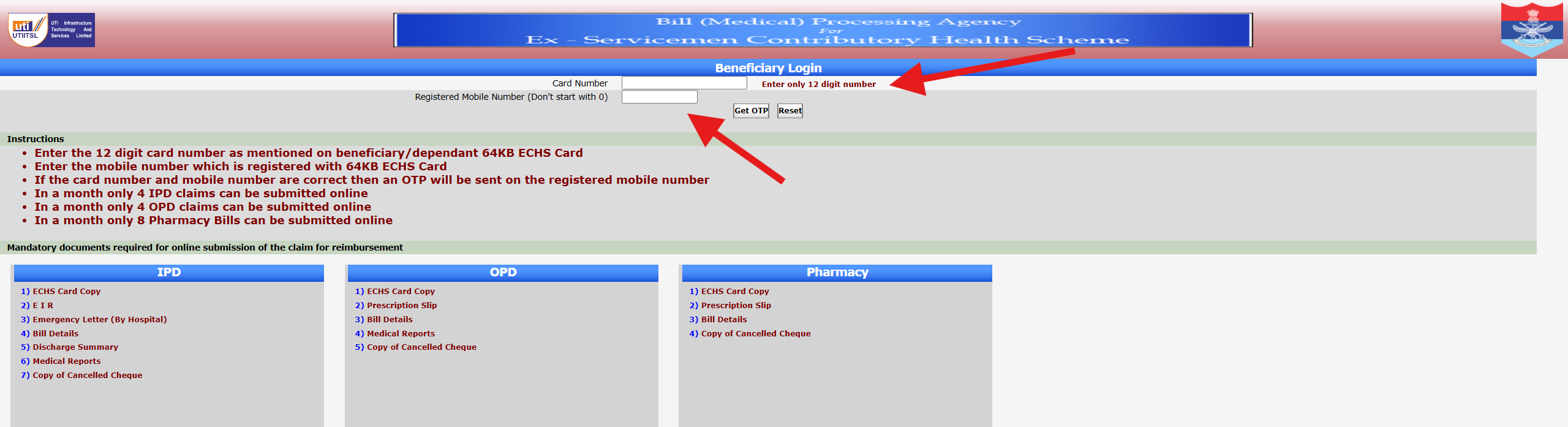
Login to the ECHS beneficiary portal
Navigate to Claim Status / Reimbursement
Enter claim reference number (if available)
View processing stage
Claim Status Meaning Explained
Submitted – Claim received
Under Scrutiny – Documents under verification
Approved – Passed for payment
Paid – Amount credited
Rejected – Claim not admissible
How Long Does ECHS Claim Processing Take?
OPD claims: 30–45 days
IPD claims: 45–90 days
Emergency cases: Depends on verification
Delays usually occur due to incomplete documents.
What To Do If Claim Is Stuck?
Contact parent polyclinic
Verify missing documents
Check referral validity
Avoid duplicate submissions
Conclusion
Checking ECHS claim status online in 2026 is simple and transparent. Keeping documents complete ensures faster reimbursement.
The Ex-Servicemen Contributory Health Scheme (ECHS) provides online services for pensioners, widows, and dependents through its beneficiary login system. With increasing digital usage, many users now prefer checking their ECHS details online instead of visiting a polyclinic.
This 2026 guide explains how ECHS beneficiary login works, who can use it, and what to do if you face problems.
Who Can Use ECHS Beneficiary Login?
The following categories are eligible to use the ECHS beneficiary login:
Ex-servicemen pensioners
Family pension holders (widows)
Dependents registered under ECHS
Disabled children and senior dependents
Each beneficiary must have a valid ECHS Smart Card linked to their mobile number.
How to Login as an ECHS Beneficiary (Step-by-Step)
Open the official ECHS portal
Choose Beneficiary Login
Enter your Smart Card number or registered ID
Verify using OTP sent to your registered mobile
Access dashboard services
What Services Are Available After Login?
Once logged in, beneficiaries can:
View personal and dependent details
Track claim or reimbursement status
Check referral history
Verify ECHS card validity
Common ECHS Beneficiary Login Problems
OTP not received
Mobile number not updated
Smart card details mismatch
Temporary server downtime
Most issues can be resolved by updating details at your parent polyclinic.
Tips for Smooth Login in 2026
Keep your mobile number updated
Use a stable internet connection
Avoid repeated OTP requests
Try logging in during non-peak hours
Final Words
ECHS beneficiary login makes healthcare management easier for ex-servicemen and families. If login issues persist, contacting your nearest ECHS polyclinic is the safest solution.
After submitting a reimbursement claim, beneficiaries often want to know how to check ECHS claim status online. The beneficiary login makes this process simple and transparent.
What You Can Check After Login
Using ECHS Beneficiary Login, you can:
Track OPD / IPD claims
Check medicine bill reimbursement
See claim approval or rejection status
Step-by-Step: Check ECHS Claim Status
Visit the official ECHS website
Click on Beneficiary Login
Enter Smart Card number & mobile number
Verify OTP
Open Claim Status section
Claim Status Meaning
Under Process: Verification pending
Approved: Payment will be credited
Rejected: Documents or rules not matched
What to Do If Claim Is Pending Too Long
Recheck uploaded documents
Contact your ECHS polyclinic
Keep claim reference number ready
Conclusion
The ECHS Beneficiary Login helps ex-servicemen and dependents stay updated on their medical claims without repeated visits to the polyclinic. Knowing how to use it correctly saves time and effort.
👉 Must read next:ECHS Login Not Working? Common Fixes
The ECHS Smart Card plays a vital role in accessing online services under the Ex-Servicemen Contributory Health Scheme. Many users search for “ECHS smart card login” without understanding how it actually works.
This article explains how the smart card is used for beneficiary login, and how to avoid common mistakes.
What Is an ECHS Smart Card?
An ECHS Smart Card contains:
Unique beneficiary number
Dependent details
Linked polyclinic information
It is mandatory for:
OPD/IPD treatment
Medicine bill reimbursement
Online claim tracking
How Smart Card Login Works in ECHS
There is no separate smart card portal. The card number is used to authenticate beneficiaries on the ECHS Beneficiary Login portal.
Steps:
Visit the official ECHS website
Open Beneficiary Login
Enter Smart Card number
Verify OTP sent to registered mobile
Common Smart Card Login Issues
Card number mismatch
Mobile number not linked
Data not updated in ECHS system
Solution: Visit your parent polyclinic for verification.
Important Advice
Never share your smart card number or OTP with anyone.
👉 Related read:ECHS Claim Status – How to Check Online
Many ECHS beneficiaries face issues while trying to access the ECHS Beneficiary Login portal. Problems like OTP failure, invalid smart card number, or server errors are common—especially during peak hours.
This guide explains the most common reasons why ECHS login does not work and how you can fix them easily.
Common ECHS Beneficiary Login Problems & Solutions
1. OTP Not Received
Network issues or DND settings
Wrong mobile number registered
Fix: Retry after a few minutes or visit your parent ECHS polyclinic to verify your mobile number.
2. Invalid Smart Card Number
Incorrect digits entered
Extra spaces while typing
Fix: Enter the full 12-digit ECHS card number carefully without spaces.
3. Mobile Number Changed
If your registered mobile number is inactive, OTP login will fail.
Fix: Submit a mobile update request at your ECHS polyclinic with ID proof.
4. Website Not Opening
ECHS servers may slow down during heavy traffic.
Fix: Try accessing the portal early morning or late night using Chrome or Firefox.
5. “No Record Found” Error
This usually happens with newly issued smart cards.
Fix: Wait for data sync or confirm details with the polyclinic.
Final Tip
If login issues continue, always contact your ECHS Polyclinic for official support.
👉 Also read:ECHS Beneficiary Login – Step-by-Step Guide
The ECHS Beneficiary Login allows Ex-Servicemen and their registered dependents to access online services under the Ex-Servicemen Contributory Health Scheme (ECHS). Through this login, beneficiaries can check claim status, submit medicine reimbursement details, verify personal records, and track medical services linked to their ECHS smart card.
This article explains how to log in, what details are required, common problems faced by users, and how to fix them easily.
Disclaimer: This website is not affiliated with ECHS or the Government of India. The information provided here is for guidance only. Always use the official ECHS portal for final actions.
What Is ECHS Beneficiary Login?
ECHS Beneficiary Login is an online access facility provided to registered ECHS members. It helps beneficiaries manage their medical and reimbursement-related information without visiting the polyclinic repeatedly.
Using this login, beneficiaries can:
Check ECHS claim status
Track medicine bill reimbursement
Verify ECHS smart card details
View registered dependents
Follow up on submitted claims
Official ECHS Beneficiary Login Portal
All beneficiary services are available on the official ECHS website:
The ECHS Smart Card Login is an essential step for Ex-Servicemen and their dependents to access medical services, claim reimbursements, and verify beneficiary details under the Ex-Servicemen Contributory Health Scheme (ECHS).
Many users face confusion while logging in for the first time or when checking claim-related details. This guide explains how ECHS Smart Card login works, what details are required, and how to fix common problems.
⚠️ Disclaimer: This website is not the official ECHS portal. It is an informational guide created to help beneficiaries understand ECHS processes. For official services, always visit https://www.echs.gov.in.
What Is an ECHS Smart Card?
The ECHS Smart Card is issued to eligible Ex-Servicemen and their dependents after successful registration under ECHS. It contains:
A unique card number
Beneficiary and dependent details
Linked polyclinic information
Eligibility for cashless treatment and reimbursement
The smart card is required for:
OPD/IPD treatment
Medicine bill claims
Hospital referrals
Online claim tracking
Is There a Separate “ECHS Smart Card Login”?
Many users search for “ECHS smart card login”, but it’s important to understand this clearly:
👉 There is no separate login portal only for smart cards. 👉 The Smart Card number is used as an identifier during:
Beneficiary login
Claim submission
Claim status checking
Hospital verification
Official ECHS Login Portal
All smart card–related online services are accessed through the ECHS Beneficiary Login portal:
This builds topical authority and improves rankings.
Final Words
The ECHS Smart Card is the backbone of all online and offline ECHS services. While there is no separate “smart card login,” understanding how it integrates with the beneficiary portal helps avoid confusion and delays.
If you face persistent login issues, always contact your ECHS Polyclinic for official assistance.