How to Login to ECHS Beneficiary Portal Using Card Number & OTP (Step-by-Step Guide)

The ECHS Beneficiary Login portal allows ex-servicemen and their dependents to submit medical reimbursement claims online and track claim status. The login process is OTP-based, ensuring security and ease of access.

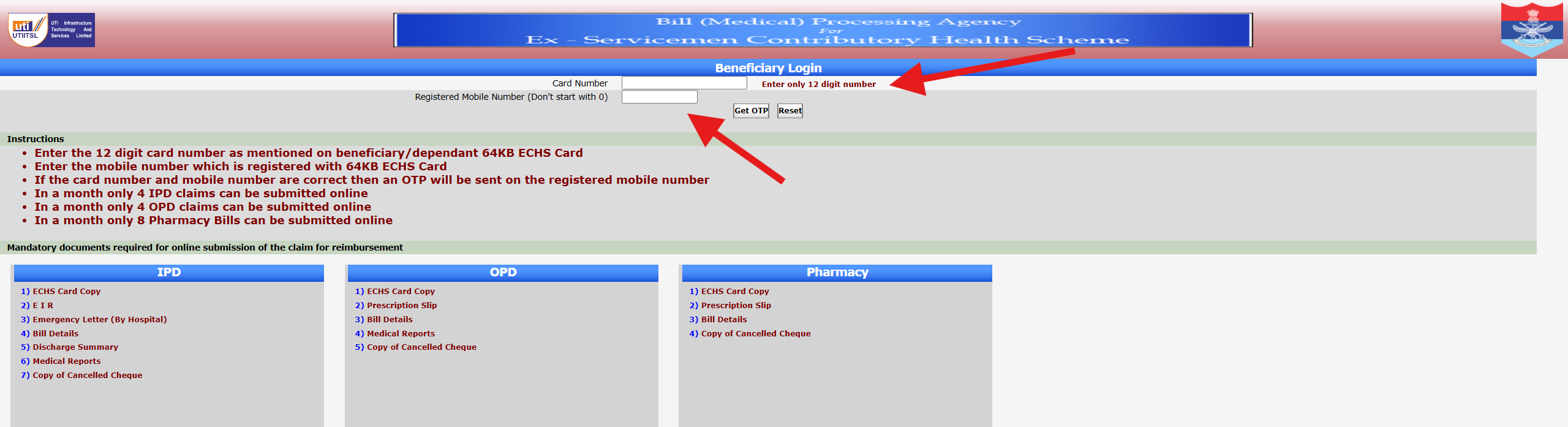
This guide explains how to log in to the ECHS beneficiary portal using your 12-digit ECHS card number and registered mobile number, based on the official screen shown above.


Who Can Use the ECHS Beneficiary Login?

The following beneficiaries can access this login system:

  • Ex-servicemen registered under ECHS
  • Dependents listed on a valid ECHS card
  • Widows of ex-servicemen covered under ECHS

Your ECHS card and mobile number must be linked and active.


Step-by-Step Process to Login to ECHS Portal

Step 1: Open the Official ECHS Beneficiary Login Page

Use a desktop or laptop for best results. Ensure you are on the official ECHS portal page that shows “Beneficiary Login” at the top.


Step 2: Enter Your 12-Digit ECHS Card Number

  • Enter only the 12-digit card number
  • Do not add spaces or extra characters
  • The number must match exactly as printed on your 64KB ECHS card

📌 Important: Entering an incorrect card number will prevent OTP generation.


Step 3: Enter Registered Mobile Number

  • Enter the mobile number registered with your ECHS card
  • Do not start the number with 0
  • Ensure the mobile network is active

Step 4: Click “Get OTP”

  • If both card number and mobile number are correct, an OTP will be sent
  • OTP delivery usually takes a few seconds

If required, you may click Reset to clear entered details.


Step 5: Enter OTP and Proceed

  • Enter the OTP exactly as received
  • Submit to access your ECHS claim dashboard

Once logged in, you can submit claims or check claim status.


Important Instructions Shown on the Login Page

The portal clearly mentions the following limits:

  • Maximum 4 IPD claims per month
  • Maximum 4 OPD claims per month
  • Maximum 8 Pharmacy bills per month

Submitting beyond these limits may result in rejection.


Documents Required for Online Claim Submission

After successful login, you must upload documents based on claim type:

IPD (Hospitalisation)

  • ECHS Card Copy
  • Emergency Information Report (EIR)
  • Emergency Letter (if applicable)
  • Hospital Bills
  • Discharge Summary
  • Medical Reports
  • Cancelled Cheque Copy

OPD Claims

  • ECHS Card Copy
  • Prescription Slip
  • Bill Details
  • Medical Reports
  • Cancelled Cheque Copy

Pharmacy Claims

  • ECHS Card Copy
  • Prescription Slip
  • Bill Details
  • Cancelled Cheque Copy

Ensure documents are clear, readable, and complete.


Common Login Problems & Solutions

OTP Not Received

  • Check network coverage
  • Wait 1–2 minutes and retry
  • Ensure mobile number is correctly registered with ECHS

Invalid Card Number Error

  • Recheck the 12-digit number
  • Avoid copy-paste errors
  • Confirm card validity with your parent polyclinic

Portal Not Loading

  • Try a different browser
  • Clear cache
  • Access during non-peak hours

Security Tips for Beneficiaries

  • Never share OTP with anyone
  • Log out after use
  • Avoid public computers for login
  • Keep mobile number updated at ECHS polyclinic

Frequently Asked Questions (FAQs)

Is password required for ECHS beneficiary login?

No. Login is done using OTP only.

Can dependents log in using their card number?

Yes, if their mobile number is registered with ECHS.

What if my mobile number is not updated?

You must visit your parent ECHS polyclinic to update it.

Is the portal available 24×7?

Mostly yes, but temporary downtime may occur due to maintenance.


Conclusion

The ECHS Beneficiary Login portal is designed to make medical claim submission and tracking easier for ex-servicemen and their families. By correctly entering the 12-digit ECHS card number and registered mobile number, beneficiaries can securely access online services using OTP-based login.

Disclaimer:
This article is for informational purposes only. The website is not affiliated with ECHS, the Ministry of Defence, or the Government of India. Always verify details from official ECHS sources.
How to Access the ECHS Portal Online – Step-by-Step Guide for Beneficiaries (2025)

The Ex-Servicemen Contributory Health Scheme (ECHS) provides online facilities for beneficiaries to check medical claim status, access hospital details, and manage reimbursement-related services. To make these services accessible, ECHS operates an official Bill (Medical) Processing Agency portal, which many beneficiaries use for login and claim tracking.

This article explains how to access the ECHS portal online, what each section on the screen means, and how beneficiaries can safely log in and use the available options.


What Is the ECHS Online Portal?

The ECHS online portal is an official digital platform used for:

  • Beneficiary login
  • Medical claim status checking
  • Hospital and empanelment details
  • Reimbursement-related processing

The portal is mainly managed through the ECHS Bill (Medical) Processing Agency, which handles claim verification and processing.


Understanding the ECHS Portal Home Screen

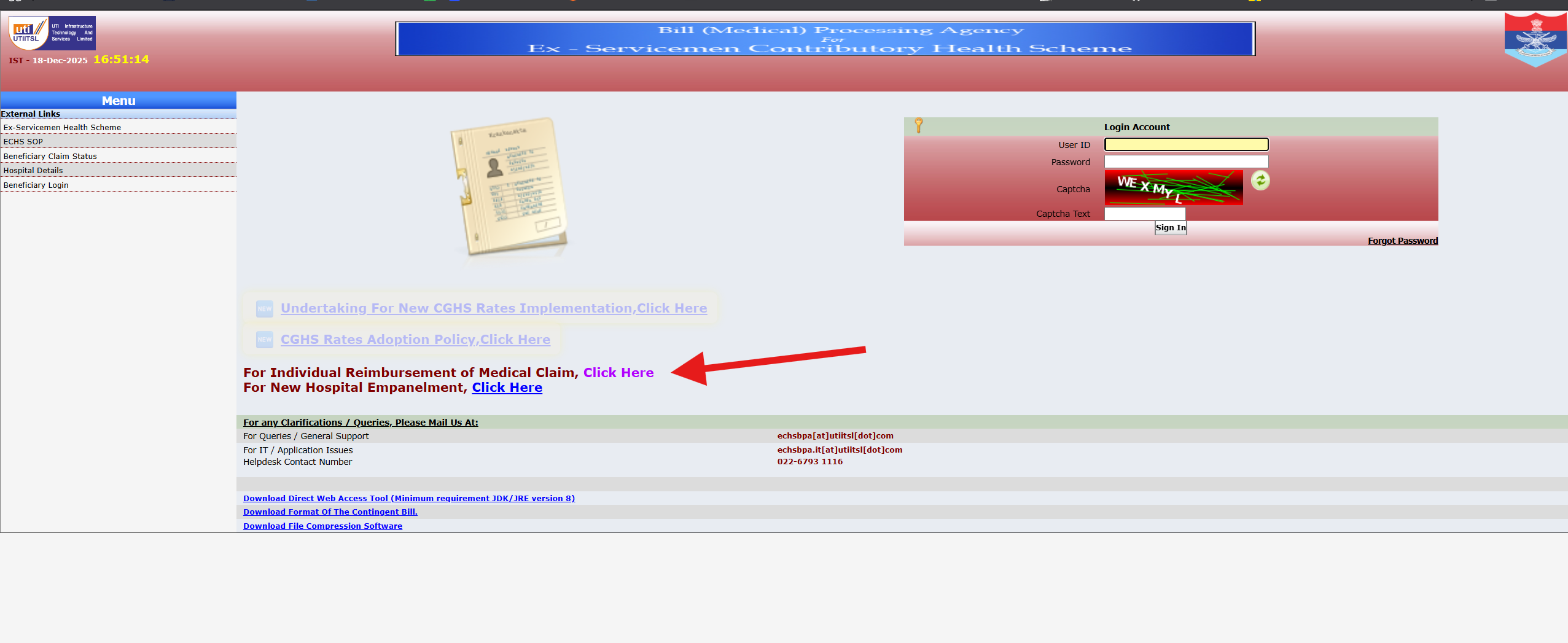
When you open the ECHS portal, you will typically see:

Top Header Section

  • Portal title related to Bill (Medical) Processing Agency – ECHS
  • Date and time (Indian Standard Time)
  • Official government and service logos

This confirms you are on the official ECHS system.


Left-Side Menu (Navigation Panel)

The left menu usually contains links such as:

  • Ex-Servicemen Health Scheme
  • ECHS SOP (Standard Operating Procedures)
  • Beneficiary Claim Status
  • Hospital Details
  • Beneficiary Login

These options allow users to directly access the required service without navigating multiple pages.


How to Log in to the ECHS Portal (Step-by-Step)

Follow these steps carefully to access your ECHS account:

Step 1: Open the Official ECHS Portal

Use a desktop or laptop browser for a smoother experience. Ensure your internet connection is stable.


Step 2: Locate the Login Account Section

On the right side of the screen, you will see the Login Account box with the following fields:

  • User ID
  • Password
  • Captcha
  • Captcha Text box
  • Sign In button

Step 3: Enter Login Credentials

  • Enter your User ID exactly as provided
  • Type your password carefully
  • Enter the captcha text shown in the image

Captcha is mandatory for security and must match exactly.


Step 4: Click “Sign In”

Once details are correct, click the Sign In button to access your dashboard.


Forgot Password Option

If you have forgotten your password, use the “Forgot Password” link provided below the login section and follow the instructions.


How to Check ECHS Medical Claim Status

If you only want to check your claim status:

  1. Click “Beneficiary Claim Status” from the left menu
  2. Enter required reference details
  3. View current claim status such as:
    • Under Process
    • Approved
    • Rejected (with remarks, if any)

Other Important Links on the Portal

The portal also provides:

  • Notifications related to CGHS rate updates
  • Hospital empanelment information
  • Download links for contingent bill formats
  • Technical helpdesk contact details

These links are useful for beneficiaries and hospitals alike.


Common Problems While Accessing ECHS Portal

1. Login Page Not Loading

  • Try refreshing the page
  • Use a different browser
  • Access during non-peak hours

2. Invalid Login Credentials

  • Double-check User ID and password
  • Ensure Caps Lock is off
  • Use the Forgot Password option if needed

3. Captcha Error

  • Reload captcha using refresh icon
  • Enter characters carefully

Important Tips for Safe Access

  • Always use the official ECHS portal
  • Never share login details with anyone
  • Log out after use, especially on shared computers
  • Keep your contact details updated with your parent ECHS polyclinic

Frequently Asked Questions (FAQs)

Who can access the ECHS portal?

Registered ECHS beneficiaries, authorized hospital users, and officials.

Is the ECHS portal available 24×7?

Generally yes, but it may be temporarily unavailable during maintenance.

Can dependents access the portal?

Access depends on registration and linked credentials.


Conclusion

The ECHS online portal makes it easier for ex-servicemen and their families to access medical claim information and related services without visiting offices repeatedly. By understanding the portal layout and following the correct login steps, beneficiaries can safely and efficiently access ECHS services online.

Disclaimer:
This article is for informational purposes only. The website is not affiliated with ECHS, the Ministry of Defence, or the Government of India. Always verify information from official ECHS sources.

ECHS Login Problems & Fix – Common Issues and Easy Solutions (2025 Guide)

The Ex-Servicemen Contributory Health Scheme (ECHS) provides essential healthcare services to ex-servicemen and their dependents. Many beneficiaries use the ECHS online portal for services such as online applications, reimbursement claims, and beneficiary details.

However, users often face ECHS login problems, especially while accessing the portal using their ECHS card number or registered mobile number. If you are struggling to log in, this guide will help you understand the most common ECHS login issues and their practical fixes.


Common ECHS Login Problems

Below are the most frequently reported issues faced by ECHS beneficiaries while logging in to the portal.


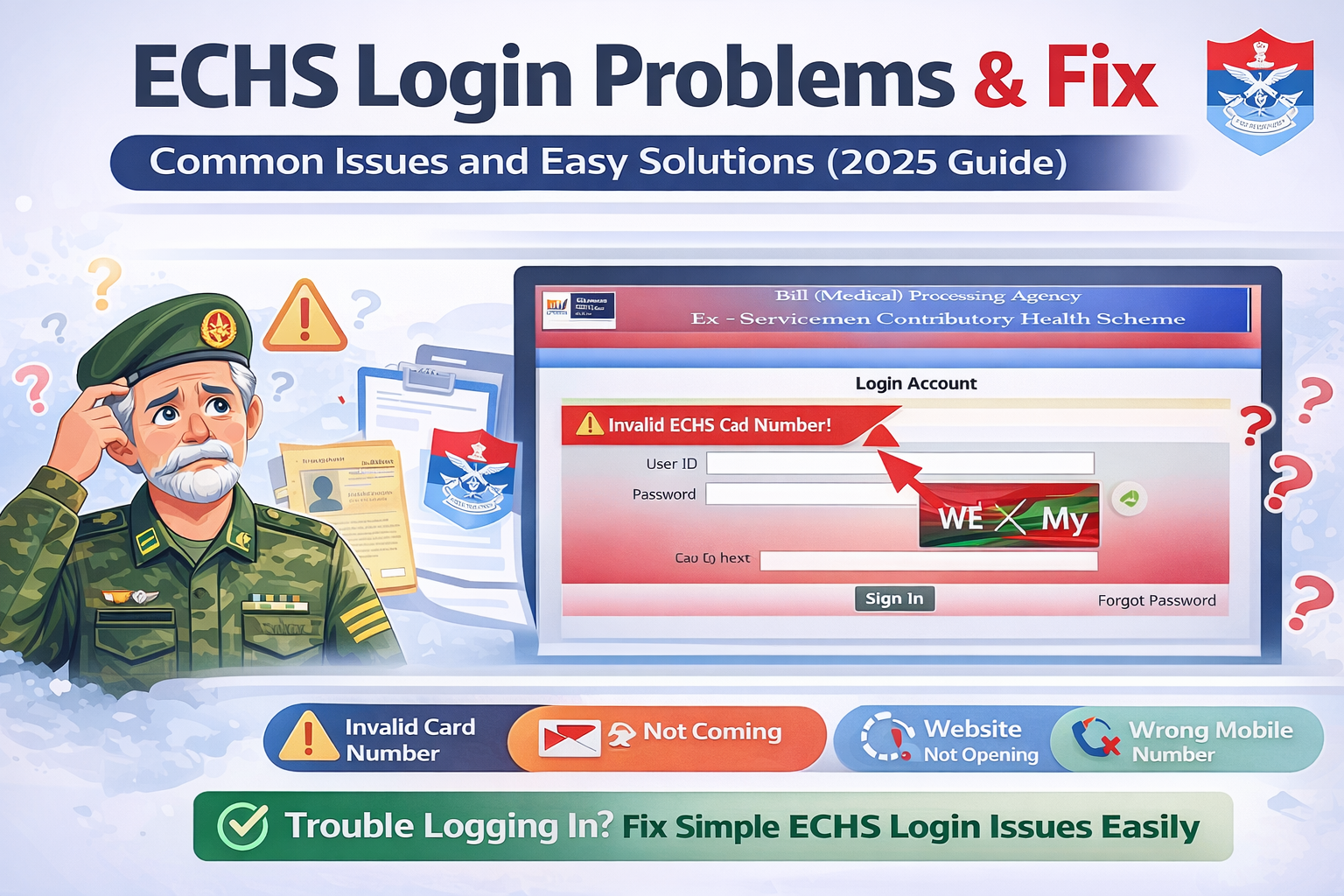
1. Invalid ECHS Card Number Error

Problem

You may see an error like “Invalid ECHS Card Number” while logging in.

Possible Reasons

  • Incorrect entry of the 12-digit ECHS card number
  • Extra space before or after the number
  • Using an expired or deactivated ECHS card

Fix

  • Carefully re-enter the 12-digit ECHS card number
  • Avoid copy-paste; type manually
  • Ensure your ECHS card is active and valid
  • If the card is expired, contact your parent ECHS polyclinic

2. OTP Not Received on Registered Mobile Number

Problem

OTP is not delivered even after multiple attempts.

Possible Reasons

  • Poor mobile network coverage
  • DND (Do Not Disturb) enabled
  • Mobile number not updated in ECHS records
  • Server delay

Fix

  • Check network signal and try again after a few minutes
  • Restart your phone
  • Disable DND temporarily
  • Ensure your mobile number is updated at your ECHS polyclinic
  • Try logging in during non-peak hours

3. ECHS Website Not Opening or Loading Slowly

Problem

The ECHS portal does not load or gets stuck.

Possible Reasons

  • Heavy traffic on the website
  • Server maintenance
  • Browser cache issues

Fix

  • Refresh the page after a few minutes
  • Clear browser cache and cookies
  • Try opening the website in Incognito mode
  • Use a different browser (Chrome / Edge / Firefox)
  • Avoid peak hours (morning and afternoon)

4. Login Successful but Dashboard Not Loading

Problem

You log in successfully but cannot access services or dashboard.

Possible Reasons

  • Session timeout
  • Browser compatibility issue
  • Temporary portal glitch

Fix

  • Log out and log in again
  • Clear cache and cookies
  • Use a desktop or laptop instead of mobile
  • Try a different browser

5. Mobile Number Not Linked With ECHS Card

Problem

OTP is sent to an unknown or old mobile number.

Fix

  • Visit your parent ECHS polyclinic
  • Request mobile number update
  • Carry ECHS card and valid ID proof
  • After updating, wait 24–48 hours and try again

6. “Service Temporarily Unavailable” Error

Problem

The portal shows a service unavailable message.

Reason

  • Backend maintenance or technical upgrade

Fix

  • This is a server-side issue
  • Wait and try again after some time
  • Check during late evening or early morning hours

7. Forgot Login Details or Unable to Authenticate

Fix

  • Use the OTP-based login only
  • Ensure correct ECHS card number and mobile number
  • If problem persists, contact your polyclinic

ECHS Login Tips for Smooth Access

✔ Always use a stable internet connection
✔ Prefer desktop or laptop for login
✔ Keep ECHS card details handy
✔ Login during non-peak hours
✔ Regularly update your mobile number


What to Do If ECHS Login Problem Is Not Fixed?

If none of the above solutions work:

  • Visit your parent ECHS polyclinic
  • Contact the ECHS Regional Centre
  • Carry:
    • ECHS card
    • Aadhaar / ID proof
    • Registered mobile number

They can verify records and resolve backend issues.


Frequently Asked Questions (FAQs)

Why is ECHS OTP not coming?

OTP issues usually occur due to network problems, DND settings, or an unregistered mobile number.

Can I log in to ECHS portal without OTP?

No. ECHS uses OTP-based authentication only.

Is ECHS login available 24×7?

The portal is generally available 24×7 but may be temporarily down due to maintenance.

Can dependents log in to the ECHS portal?

Yes, if their mobile number is registered and linked with the ECHS card.


Conclusion

ECHS login problems are usually caused by minor technical issues, outdated mobile details, or server load. Most of these problems can be resolved easily by following the fixes mentioned above.

For persistent login issues, contacting your parent ECHS polyclinic is the most reliable solution.

How to Apply for ECHS Online

Complete Application Guide

The Ex-Servicemen Contributory Health Scheme (ECHS) provides comprehensive medical facilities to ex-servicemen and their eligible dependents through ECHS polyclinics and empanelled hospitals across India. To avail these benefits, eligible beneficiaries must first apply for and register under ECHS.

With increasing digital adoption, many people search for “How to apply for ECHS online”. This article explains the ECHS online application process step by step, eligibility criteria, documents required, and common mistakes to avoid.

Disclaimer:
This article is for informational purposes only. echsmediclaim.com is not affiliated with ECHS, the Ministry of Defence, or the Government of India. Always verify information from official ECHS sources before applying.


What Is ECHS Application?

An ECHS application is the process through which an ex-serviceman or eligible beneficiary registers under the ECHS scheme to receive medical benefits. Once registered, the applicant is issued an ECHS smart card, which is required to access treatment at ECHS polyclinics and empanelled hospitals.


Who Can Apply for ECHS?

The following categories are generally eligible to apply for ECHS:

  • Ex-servicemen drawing pension
  • Ex-servicemen with disability pension
  • Family pensioners / widows of ex-servicemen
  • Eligible dependents (spouse, children, parents) as per ECHS rules

Eligibility is subject to prevailing ECHS guidelines.


Can You Apply for ECHS Online?

Yes, ECHS application can be initiated online, but it is important to understand that:

  • The online process is part of a hybrid system
  • Physical verification and submission at the parent ECHS polyclinic is still required
  • Final issuance of the ECHS card happens offline

The online system helps in:

  • Data entry
  • Appointment booking
  • Reducing manual paperwork

Documents Required for ECHS Online Application

Before starting the application, keep the following documents ready:

  • Discharge book or PPO (Pension Payment Order)
  • Aadhaar card
  • PAN card (if available)
  • Proof of residence
  • Passport-size photographs
  • Dependency certificates (if applicable)
  • Bank details
  • Mobile number and email ID

Having complete documents helps avoid delays.


Step-by-Step Process to Apply for ECHS Online

Step 1: Visit the Official ECHS Portal

  • Access the official ECHS website through a secure browser
  • Navigate to the ECHS application or registration section

⚠️ Note: Do not share login credentials on any third-party website.


Step 2: Fill the Online Application Form

  • Enter personal details of the ex-serviceman
  • Add dependent details carefully
  • Ensure names match official records

Step 3: Upload Required Documents

  • Upload scanned copies of required documents
  • Ensure clarity and correct file format
  • Blurred or incorrect uploads may lead to rejection

Step 4: Choose Parent Polyclinic

  • Select the ECHS polyclinic nearest to your residence
  • This polyclinic will handle verification and future services

Step 5: Pay Contribution (If Applicable)

  • Some applicants are required to pay a one-time contribution
  • Payment is usually made through authorized payment modes
  • Keep payment receipt safely

Step 6: Book Appointment for Physical Verification

  • After online submission, book an appointment
  • Visit the selected ECHS polyclinic with original documents

Step 7: Verification & Card Issuance

  • Polyclinic verifies documents
  • Biometric data may be collected
  • ECHS smart card is issued after approval

Online vs Offline ECHS Application

AspectOnlineOffline
Data entryOnlineManual
Document uploadYesPhysical
VerificationOfflineOffline
Card issuanceOfflineOffline

The online process mainly simplifies data submission, but physical verification remains mandatory.


How Long Does ECHS Application Take?

  • Processing time may vary
  • Generally takes a few weeks after verification
  • Delays can occur due to:
    • Incomplete documents
    • Incorrect details
    • High application volume

Common Mistakes to Avoid While Applying

Avoid these common errors:

  • Incorrect spelling of names
  • Uploading unclear documents
  • Selecting wrong parent polyclinic
  • Missing dependent details
  • Not carrying originals for verification

Careful submission reduces rejection chances.


Tips for Smooth ECHS Online Application

  • Double-check all entered details
  • Keep multiple copies of documents
  • Follow up with parent polyclinic if needed
  • Track application status as advised by ECHS staff

Frequently Asked Questions (FAQs)

Is ECHS application completely online?

No. Online application is only the first step. Physical verification is mandatory.


Can widows apply for ECHS online?

Yes, eligible widows/family pensioners can apply as per ECHS rules.


Is Aadhaar mandatory for ECHS application?

Aadhaar is commonly required, but applicants should verify latest guidelines.


Can dependents be added later?

Yes, dependents can usually be added later subject to ECHS rules.


Important Note

ECHS application rules and procedures may change. Applicants should always confirm the latest instructions from official ECHS notifications or their parent polyclinic before applying.


Conclusion

Applying for ECHS online is a convenient way to begin registration under the scheme. While the process simplifies data submission, applicants must complete physical verification at an ECHS polyclinic to receive the ECHS card. By understanding the process, preparing documents in advance, and avoiding common mistakes, applicants can ensure a smoother experience.

For more guides on ECHS mediclaim reimbursement, application process, treatment coverage, and polyclinic information, explore other articles on echsmediclaim.com.