ECHS Claim Status – Check Mediclaim Reimbursement Online (Step-by-Step Guide 2025)

Last Updated: 2025
Official Scheme: Ex-Servicemen Contributory Health Scheme (ECHS)


📌 What Is ECHS Claim Status?

ECHS Claim Status allows Ex-Servicemen and their dependents to track the current progress of their medical reimbursement claims submitted under the Ex-Servicemen Contributory Health Scheme (ECHS).

Using the official ECHS online portal, beneficiaries can check whether their claim is:

  • Submitted
  • Under process
  • Approved
  • Paid
  • Returned for clarification

This facility helps avoid repeated visits to ECHS Polyclinics and Regional Centres.


🔐 Who Can Check ECHS Claim Status?

You can check ECHS claim status if you are:

  • An Ex-Serviceman pensioner
  • A family pensioner
  • A dependent registered under ECHS
  • A beneficiary with a valid 64KB ECHS Smart Card

👉 If you face login issues, read:
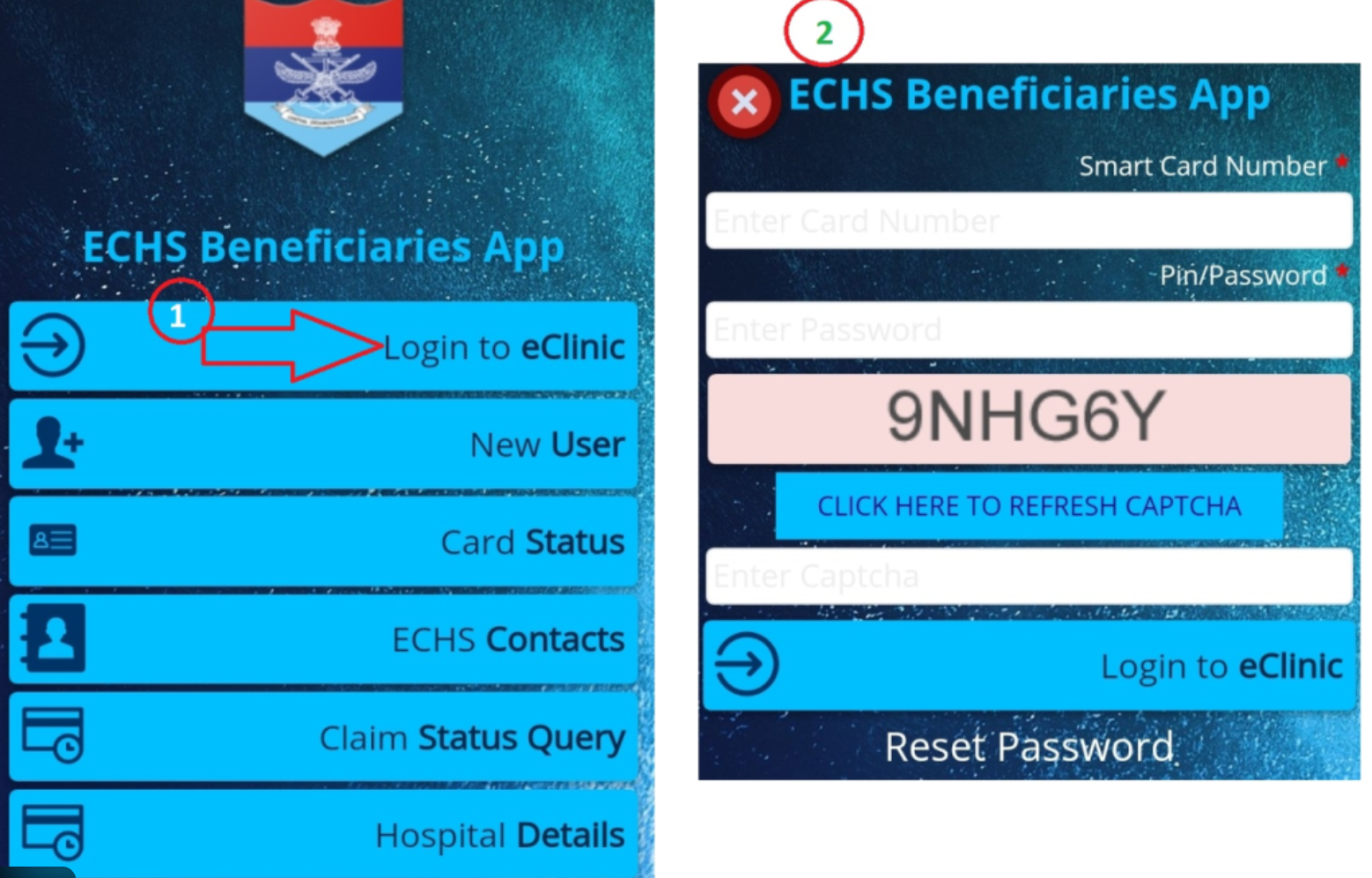
ECHS Login Not Working? Common Fixes


🌐 Official Portal to Check ECHS Claim Status

You can check your claim status only through the official ECHS portal operated by authorized agencies.

⚠️ Always use the official website. Avoid third-party or unofficial portals.


🧾 Details Required to Check Claim Status

Keep the following details ready:

  • ECHS Card Number
  • Claim ID (if available)
  • Registered Mobile Number
  • CAPTCHA (as shown on screen)

🪜 Step-by-Step: How to Check ECHS Claim Status Online

Step 1: Visit the Official ECHS Portal

Open the official ECHS website in your browser.

Step 2: Navigate to “Claim Status”

Click on Beneficiary Claim Status / Claim Tracking option.

Step 3: Enter Required Details

Fill in your:

  • ECHS Card Number or Claim ID
  • Registered mobile number
  • Captcha code

Step 4: Submit the Form

Click on Submit / Search.

Step 5: View Claim Status

Your current claim status will appear on the screen.

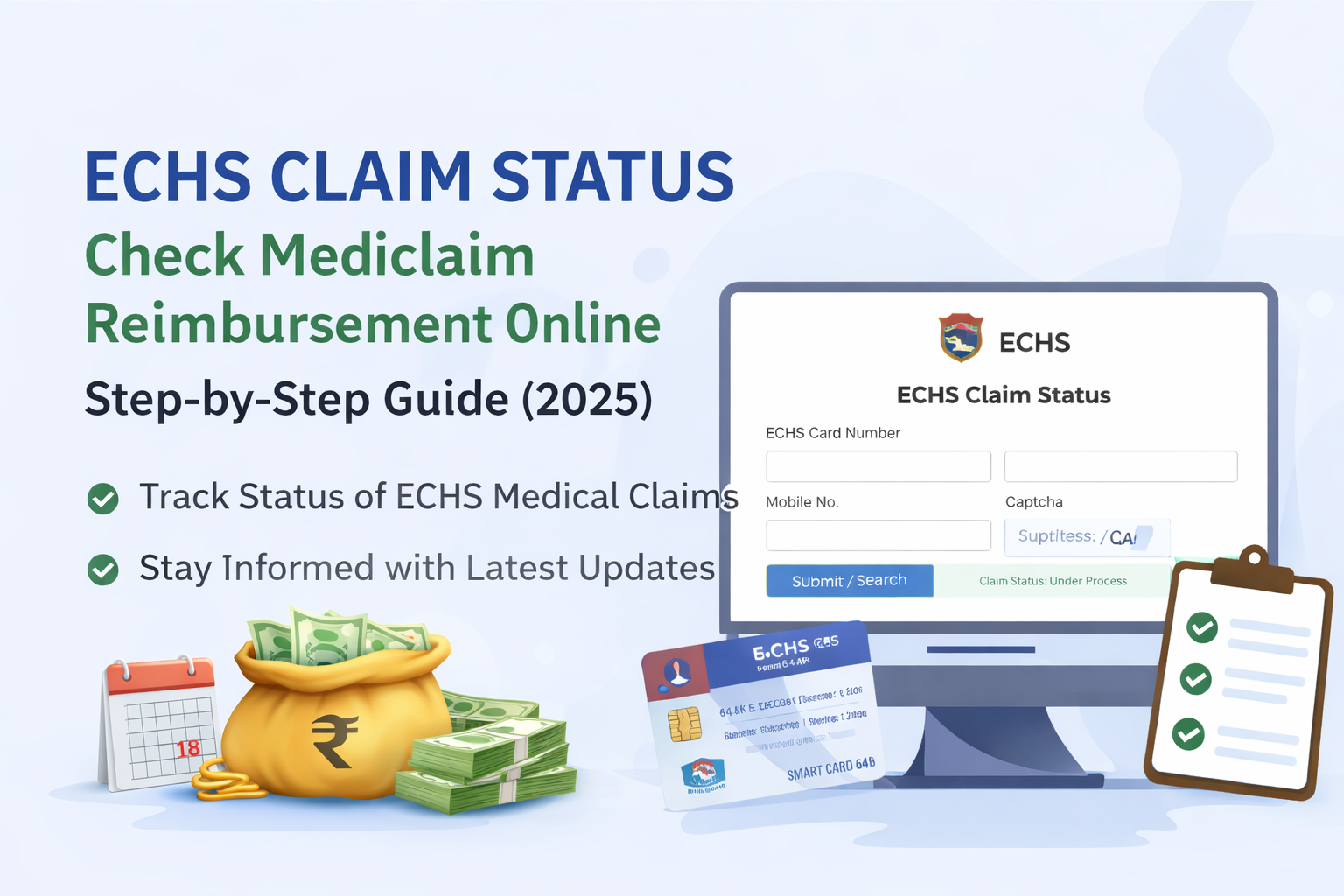
📸 [Insert screenshot of ECHS claim status page here]


📊 Understanding ECHS Claim Status Messages

Status ShownMeaning
SubmittedClaim received successfully
Under ProcessDocuments are being verified
ApprovedClaim approved for payment
PaidAmount credited to bank
ReturnedAdditional documents required
RejectedClaim not admissible

⏳ How Long Does ECHS Reimbursement Take?

Normally:

  • 30–45 days for empanelled hospitals
  • 45–60 days for non-empanelled hospital claims

Delays may occur due to:

  • Missing documents
  • Incorrect bank details
  • Incomplete referral forms

❌ Common Reasons for ECHS Claim Delay or Rejection

  • Missing referral letter
  • No Emergency Certificate (for emergency cases)
  • Mismatch in bank details
  • Bills not as per CGHS rates
  • Incomplete discharge summary

👉 Read in detail:
ECHS Reimbursement Rejection Reasons & How to Avoid Them


🛠 What To Do If ECHS Claim Is Stuck?

If your claim is pending for a long time:

  1. Contact your ECHS Polyclinic
  2. Check with Regional Centre ECHS
  3. Ensure all documents were submitted correctly
  4. Keep your Claim ID handy

📞 Refer to:
ECHS Polyclinics List with Contact Details


🔁 Can You Track Medicine Bill Claim Status Separately?

Yes. OPD medicine reimbursement claims can also be tracked using the same process.

However, timelines may differ slightly depending on:

  • Type of claim (IPD / OPD)
  • City & Regional Centre

🧠 Important Tips for Faster ECHS Claim Processing

  • Submit claims within 1 month of discharge
  • Attach all original bills
  • Ensure referral validity
  • Use correct bank IFSC
  • Avoid overwriting on forms

❓ Frequently Asked Questions (FAQ)

Q1. Can I check ECHS claim status using mobile?

Yes, the portal works on mobile browsers.

Q2. What if I forgot my Claim ID?

You can still check using your ECHS Card Number.

Q3. Is SMS sent after claim approval?

In many cases, yes—on the registered mobile number.

Q4. Can hospitals check claim status?

Yes, empanelled hospitals can track claims submitted by them.


🔗 Helpful Related Articles (Internal Links)


⚠️ Disclaimer

This article is for informational purposes only. For official updates, rules, and claim decisions, always refer to the ECHS official website or your Regional Centre.
ECHS Login Not Working? 10 Common Fixes (2025)

If you’re trying to access the ECHS login portal and it’s not working, you’re not alone. Thousands of Ex-Servicemen and dependents face login issues every month—especially during peak claim or card-related periods.

This 2025-updated guide explains the 10 most common reasons why ECHS login fails and exactly how to fix each one.

If you are new to the portal, first read our complete guide on
ECHS Login – Official Portal Link, Steps & Common Errors
to understand the correct login process.


1️⃣ Incorrect ECHS Card Number (Most Common Issue)

Problem:
The portal accepts only a 12-digit ECHS card number. Even one wrong digit causes login failure.

Fix:

  • Check the number printed on your 64KB ECHS smart card
  • Don’t add spaces or hyphens
  • Re-enter manually (avoid copy-paste)

2️⃣ Mobile Number Not Linked With ECHS Records

Problem:
OTP is sent only to the mobile number registered in ECHS records.

Fix:

  • Use the original registered mobile number
  • If changed, update it at your ECHS Polyclinic
  • Carry Aadhaar + ECHS card for verification

3️⃣ OTP Not Received or Delayed

Problem:
OTP SMS delay due to network congestion or DND services.

Fix:

  • Wait at least 2–3 minutes
  • Ensure mobile has network signal
  • Disable DND / SMS blocking
  • Retry during non-peak hours (early morning works best)

4️⃣ ECHS Server Down or Under Maintenance

Problem:
ECHS servers are frequently under maintenance—especially weekends.

Fix:

  • Try again after some time
  • Login during 10 AM – 4 PM (working days)
  • Avoid late night attempts

5️⃣ Browser Compatibility Issues

Problem:
ECHS portal doesn’t work properly on all browsers.

Best Browsers (2025):
✅ Google Chrome
✅ Microsoft Edge

Fix:

  • Clear browser cache
  • Disable ad-blockers
  • Avoid UC Browser / outdated browsers

6️⃣ Captcha Code Error

Problem:
Captcha is case-sensitive and time-limited.

Fix:

  • Enter captcha exactly as shown
  • Refresh captcha if unclear
  • Avoid auto-fill tools

7️⃣ Multiple Failed Login Attempts

Problem:
Too many wrong attempts may temporarily block login.

Fix:

  • Wait 30–60 minutes
  • Avoid repeated retries
  • Try again later with correct details

8️⃣ Password Issues (For Registered Users)

Problem:
Old or incorrect password entered.

Fix:

  • Use “Forgot Password” option
  • Answer security questions correctly
  • Reset password and login again

9️⃣ Using Wrong Login Page

Problem:
Many users click fake or outdated ECHS links from Google.

Fix:
Always use the official ECHS portal only.
Avoid third-party or copied websites.


🔟 Portal Overload During Peak Periods

Problem:
Heavy traffic during:

  • Mediclaim submission deadlines
  • Smart card updates
  • Rate revision announcements

Fix:

  • Login early morning
  • Try weekdays
  • Be patient and retry later

✅ Quick Checklist Before You Retry Login

✔ 12-digit card number
✔ Registered mobile number
✔ Stable internet
✔ Chrome / Edge browser
✔ Correct captcha
✔ Official ECHS portal


🧠 Pro Tip (Highly Recommended)

If login still fails after multiple attempts, don’t panic.

👉 Visit your nearest ECHS Polyclinic
👉 Or contact the ECHS Regional Centre with your card details


📌 Related Helpful Guides

(To improve your success rate, read these next)

  • ECHS Login – Official Portal Link, Steps & Common Errors (pillar guide)
  • ECHS OTP Not Received – How to Fix Fast
  • ECHS Password Reset Process (Step-by-Step)

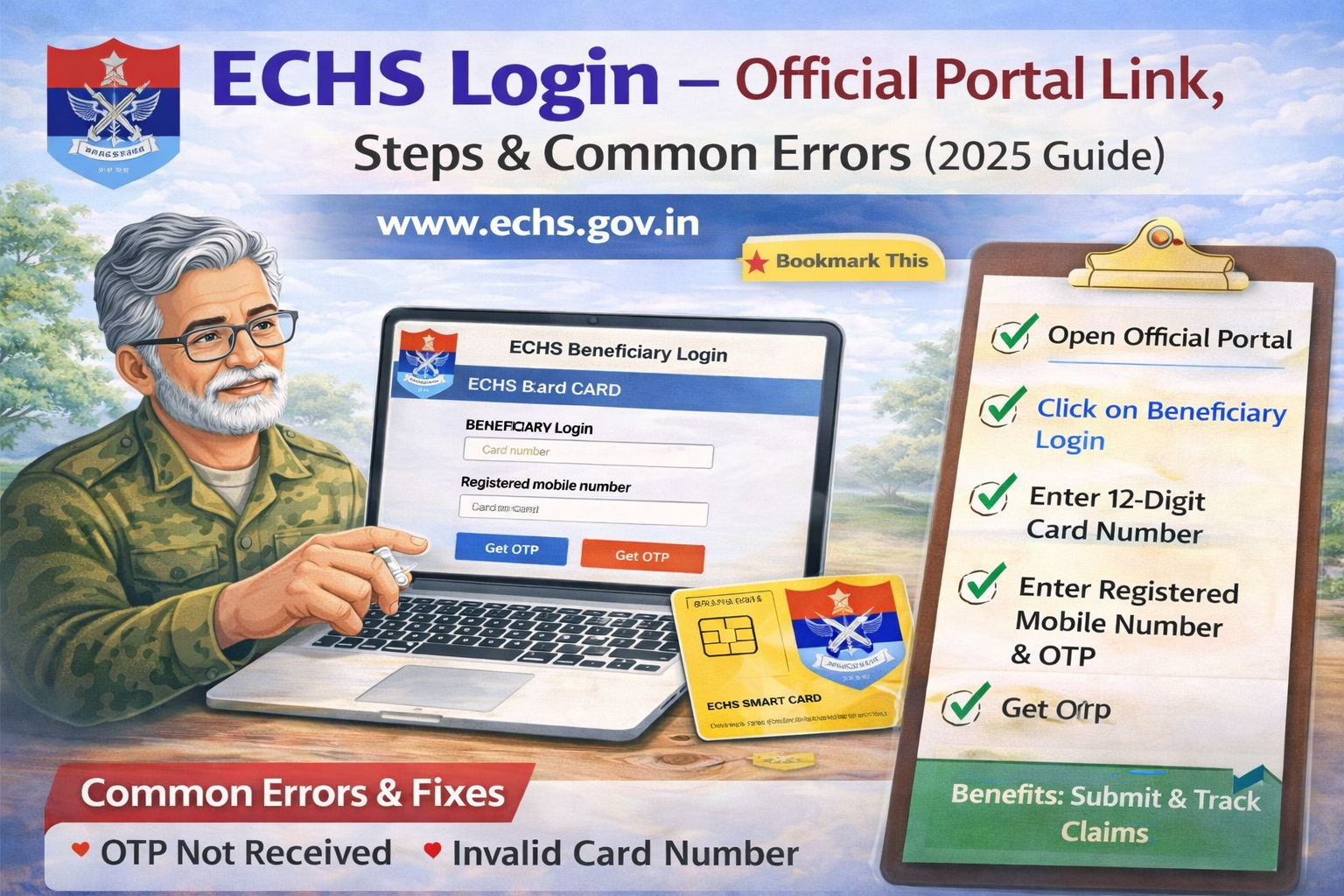
ECHS Login – Official Portal Link, Steps & Common Errors (2025 Guide)

The Ex-Servicemen Contributory Health Scheme (ECHS) provides cashless medical treatment and reimbursement facilities to ex-servicemen, their dependents, and eligible family pensioners. To access online services like medical claim submission, claim status tracking, and beneficiary details, users must log in through the official ECHS portal.

This guide explains how to log in to ECHS, provides the official portal link, and covers common login problems with easy solutions.


🔗 Official ECHS Login Portal (Verified)

Use only the official ECHS websites to avoid fraud or data theft:

⚠️ Tip: Avoid clicking login links from WhatsApp, SMS, or unknown websites. Always type the URL manually.


🧾 Who Can Use ECHS Login?

You can use the ECHS login portal if you are:

  • Ex-serviceman drawing service or disability pension
  • Family pensioner / widow
  • Registered ECHS dependent
  • Empanelled hospital or diagnostic centre (separate login)
  • ECHS administrative or medical staff

🪪 Details Required for ECHS Login

Before logging in, keep these details ready:

  • 12-digit ECHS Card Number
  • Registered mobile number (linked with ECHS)
  • OTP (sent to registered mobile)
  • Stable internet connection

✅ Step-by-Step: How to Login to ECHS Portal

Step 1: Open the Official Website

Go to 👉 https://www.echs.gov.in

Step 2: Click on “Beneficiary Login”

You will find this option on the homepage or under Online Services.

Step 3: Enter Your Card Number

  • Enter the 12-digit ECHS card number
  • Do not add spaces or special characters

Step 4: Enter Registered Mobile Number

  • Use the same mobile number registered with ECHS
  • Do not start with 0 or +91

Step 5: Get OTP

  • Click Get OTP
  • Enter the OTP received on your mobile

Step 6: Login Successfully

Once verified, you can access:

  • Claim submission
  • Claim status
  • Profile details
  • Online services

🚨 Common ECHS Login Problems & Fixes

❌ 1. OTP Not Received

Possible reasons:

  • Mobile number not updated
  • Network issue
  • Server delay

Fix:

  • Wait 2–3 minutes and retry
  • Check signal/network
  • Contact ECHS Polyclinic to update mobile number

❌ 2. Invalid Card Number Error

Reason:

  • Wrong digit entered
  • Card not activated online

Fix:

  • Recheck 12-digit number
  • Visit nearest ECHS Polyclinic for verification

❌ 3. ECHS Website Not Opening

Reason:

  • Server maintenance
  • Browser compatibility issue

Fix:

  • Try Chrome or Edge
  • Clear browser cache
  • Try again after some time

❌ 4. Login Page Loading but Not Submitting

Fixes that work:

  • Disable ad-blocker
  • Use desktop/laptop instead of mobile
  • Try incognito mode

❌ 5. “Already Registered” but Cannot Login

Reason:

  • Partial registration
  • Old mobile number linked

Fix:

  • Use Forgot Password / OTP option
  • Contact ECHS support or Polyclinic

🔐 Is ECHS Login Safe?

Yes. The ECHS portal:

  • Uses OTP-based authentication
  • Is hosted on Government of India servers
  • Does not ask for bank details during login

⚠️ Never share your OTP with anyone.


📌 Services Available After Login

Once logged in, beneficiaries can:

  • Check ECHS claim status
  • Submit medical reimbursement claims
  • View referral details
  • Access online forms & updates
  • Track bill processing (for empanelled hospitals)

🔗 Internal Articles to Link From This Page (Important)

Use these as internal links from this pillar page:

  • 👉 ECHS Login Not Working? Common Fixes
  • 👉 ECHS Forgot Password / OTP Not Received
  • 👉 ECHS Claim Status Check Online
  • 👉 ECHS Reimbursement Process Step-by-Step
  • 👉 ECHS Helpline Number for Login Issues


❓ Frequently Asked Questions (FAQs)

Q1. Can I login to ECHS without OTP?

No. OTP verification is mandatory.

Q2. Can dependents use the same login?

Yes, dependents linked to the ECHS card can access services.

Q3. Is there a mobile app for ECHS login?

Currently, ECHS services are primarily web-based.

Q4. What if my mobile number has changed?

You must update it at your ECHS Polyclinic.


📝 Final Words

The ECHS login portal is the gateway to essential healthcare and reimbursement services for ex-servicemen and their families. By using the official portal, following the correct login steps, and understanding common errors, you can avoid delays and frustration.

👉 Bookmark this page for quick access and updates.

  • Official ECHS Login Portal: Use only the verified official websites, such as https://www.echs.gov.in, to access ECHS services and avoid fraud or data theft.
  • Who Can Use ECHS Login?: Ex-servicemen with service or disability pensions, family pensioners, dependents, and healthcare staff are eligible to use the ECHS login portal.
  • Steps to Log in to ECHS: Access the portal by visiting the official website, clicking on ‘Beneficiary Login’, entering your card number and registered mobile, and then verifying via OTP.
  • Common Login Issues and Fixes: Problems like OTP not received, invalid card number, or website not opening are addressed with troubleshooting steps such as verifying details, clearing browser cache, or trying different browsers.
  • Efficacy and Security of ECHS Login: The portal ensures safety through OTP-based authentication hosted on government servers, and users should never share OTPs to maintain security.

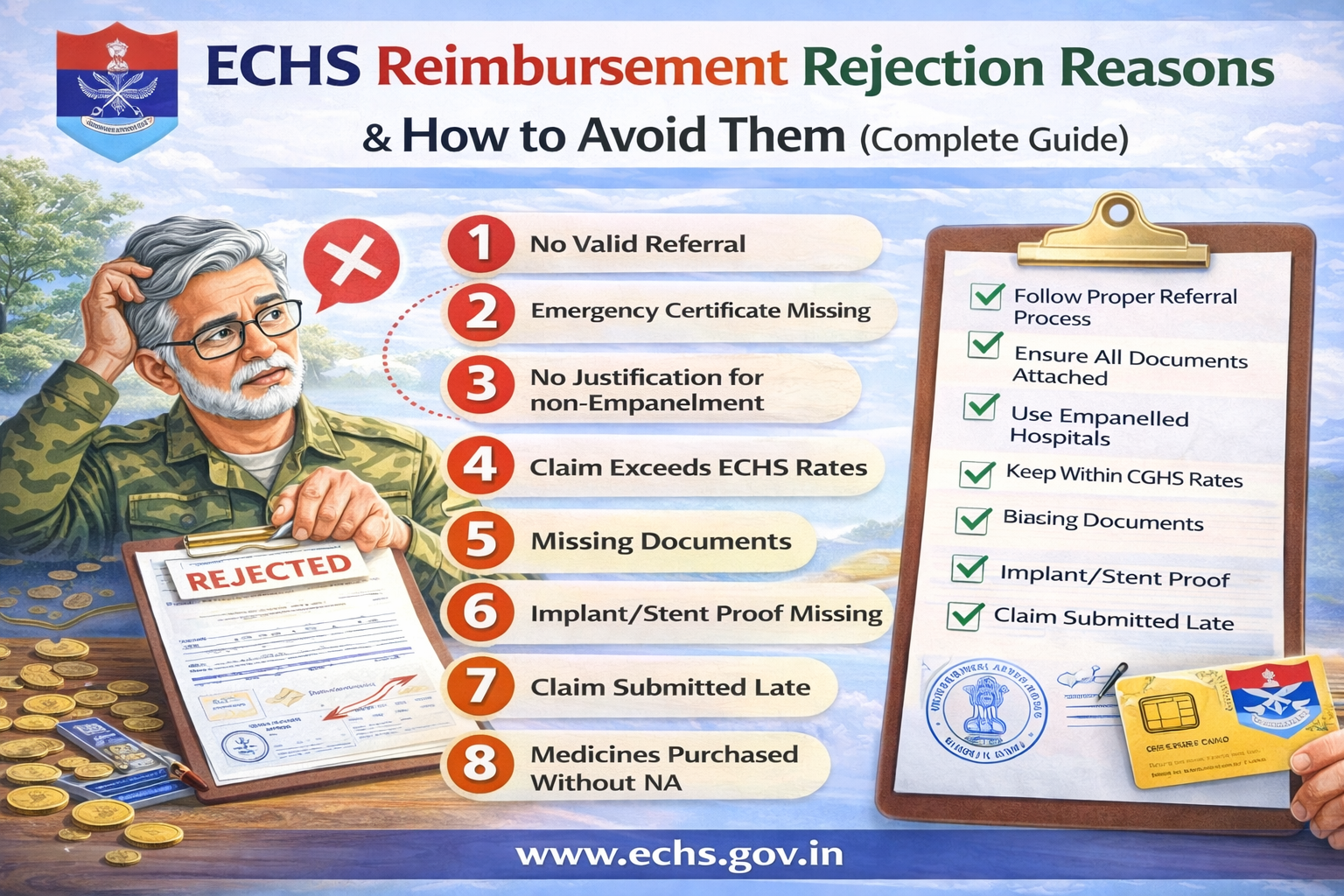
ECHS Reimbursement Rejection Reasons & How to Avoid Them (Complete Guide)

ECHS reimbursement claims are often rejected or delayed due to small procedural errors rather than medical issues. Understanding the common rejection reasons and knowing how to avoid them can save Ex-Servicemen and their families significant time, stress, and money.

This guide explains why ECHS claims get rejected and gives practical solutions to ensure smooth approval.


What Is ECHS Reimbursement?

ECHS reimbursement applies when:

  • Treatment is taken in a non-empaneled hospital (usually emergency), or
  • Payment is made by the beneficiary and later claimed, or
  • Certain medicines/tests are not available at ECHS dispensaries.

Reimbursement is processed strictly as per ECHS SOP & CGHS rates.


Top Reasons for ECHS Reimbursement Rejection

1. ❌ Treatment Without Valid Referral

Reason

  • No ECHS referral letter attached
  • Referral expired (valid only for 1 month, except oncology)

How to Avoid

  • Always obtain referral from ECHS Polyclinic
  • For follow-ups, ensure referral clearly mentions duration
  • Keep photocopies of all referrals

2. ❌ Emergency Certificate Missing or Invalid

Reason

  • Emergency treatment taken but no emergency certificate
  • Certificate not signed/stamped by hospital authority

How to Avoid

  • Obtain Emergency Certificate + EIR
  • Hospital must inform ECHS within 48 hours
  • Emergency must match approved emergency conditions

3. ❌ Treatment in Non-Empanelled Hospital Without Justification

Reason

  • Empanelled hospital available but not used
  • No proof of non-availability

How to Avoid

  • Use empanelled hospital whenever possible
  • Attach NA (Non-Availability) Certificate if applicable

4. ❌ Claim Exceeds CGHS/ECHS Rates

Reason

  • Hospital charges higher than approved rates
  • Private ward used without entitlement

How to Avoid

  • Check ward entitlement based on rank
  • Reimbursement limited to CGHS rates, even if paid more

5. ❌ Missing or Incomplete Documents

Reason

  • Missing discharge summary
  • Bills not itemized
  • Reports not signed or stamped

How to Avoid
Attach all mandatory documents:

  • Referral letter
  • Discharge summary
  • Itemized bill + final bill
  • Investigation reports
  • Implant invoices & stickers (if applicable)

6. ❌ Implant / Stent Proof Not Attached

Reason

  • Implant pouch/sticker missing
  • Invoice does not mention patient name or batch number

How to Avoid

  • Always collect:
    • Implant outer pouch
    • Batch number sticker
    • Original invoice

Without these, implant cost is rejected fully.


7. ❌ Delay in Submission of Claim

Reason

  • Claims submitted after 1 month from discharge
  • No delay waiver approval

How to Avoid

  • Submit claim immediately
  • Delay up to 6 months → Station Commander approval
  • Beyond 1 year → Central Organisation decision

8. ❌ Medicines Purchased Without NA Certificate

Reason

  • Medicines available in ECHS dispensary
  • No NA certificate from polyclinic

How to Avoid

  • Collect NA certificate before purchasing medicines
  • Only specific cases allow medicine reimbursement

9. ❌ OPD Claims Without Proper Proof

Reason

  • OPD slip missing
  • Doctor’s signature absent

How to Avoid

  • Attach:
    • Referral letter
    • OPD consultation slip
    • Doctor’s signature & stamp

10. ❌ Package Procedure Billed Incorrectly

Reason

  • Extra charges billed during package period
  • Diet, nursing, ICU billed separately

How to Avoid

  • Package includes:
    • Room rent
    • Medicines
    • Nursing
    • Investigations
  • Extra billing allowed only beyond package duration with approval

How to Ensure 100% Claim Approval

✅ Before Treatment

  • Verify empanelled hospital
  • Confirm ward entitlement
  • Collect referral or emergency certificate

✅ During Hospitalization

  • Keep all reports
  • Ask hospital for ECHS-compliant billing

✅ After Discharge

  • Arrange documents chronologically
  • Number each page
  • Submit both online (UTIITSL) and physical copy

What to Do If Your ECHS Claim Is Rejected?

  1. Ask polyclinic for written rejection reason
  2. Rectify documents (if curable)
  3. Resubmit claim
  4. If unjustified, appeal through Regional Centre → Central Organisation

Claims cannot be rejected at intermediate levels without forwarding.


Frequently Asked Questions (FAQs)

❓ Can ECHS reject a claim completely?

Yes, if:

  • No emergency
  • Fraudulent claim
  • Non-compliance with SOP

❓ Is ambulance reimbursement allowed?

❌ No. Ambulance charges are not admissible.


❓ Can I claim from insurance and ECHS both?

Yes, but ECHS reimburses only the balance after insurance.


❓ How long does reimbursement take?

  • Normal cases: 30–60 days
  • High-value cases (>5 lakhs): longer due to MoD approval

Final Advice for ECHS Beneficiaries

Most ECHS claim rejections are avoidable.
Proper referral, correct documentation, and timely submission are the keys to hassle-free reimbursement.

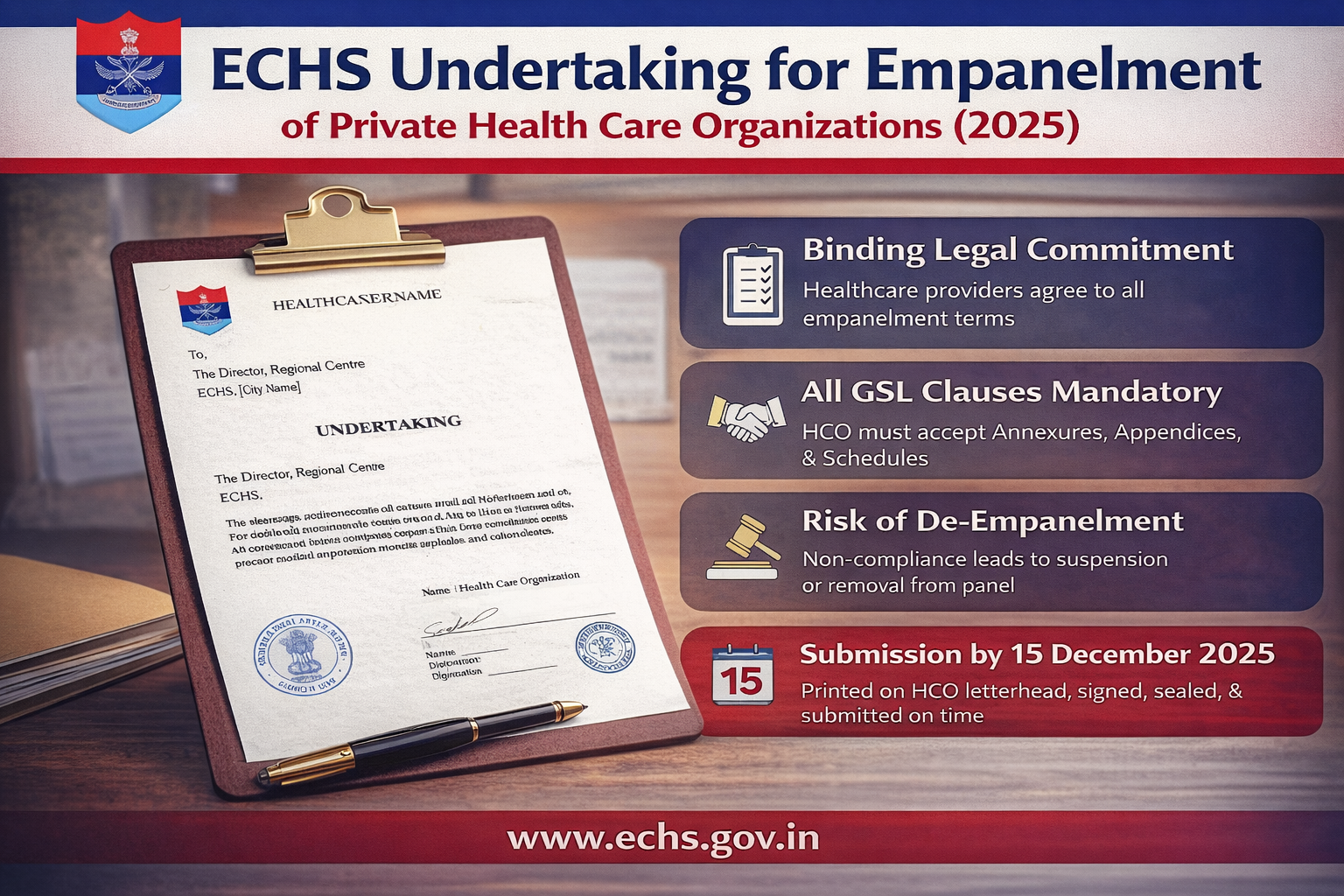
ECHS Undertaking for Empanelment of Private Health Care Organizations (2025)

Complete Guide to Mandatory Undertaking Submission under ECHS

The Ex-Servicemen Contributory Health Scheme (ECHS) requires all private hospitals, nursing homes, and diagnostic centers seeking empanelment to submit a mandatory Undertaking. This document confirms the Health Care Organization’s (HCO) acceptance of all terms and conditions laid down by ECHS for empanelment.

This article explains the purpose, legal importance, and submission requirements of the ECHS Undertaking (2025).


What Is the ECHS Undertaking?

The ECHS Undertaking is a formal legal declaration executed by a Health Care Organization in favor of the President of India, acting through the Director, Regional Centre, ECHS, under the Department of Ex-Servicemen Welfare, Ministry of Defense.

By signing this document, the HCO confirms its unconditional acceptance of all provisions mentioned in the General Service List (GSL) uploaded on the official ECHS website.


Who Must Submit the Undertaking?

This undertaking is mandatory for:

  • Private Hospitals
  • Nursing Homes
  • Diagnostic Centres
  • Dental Clinics
  • Any Health Care Organization applying for new empanelment or re-empanelment under ECHS

Key Clauses Explained in Simple Terms

1. Mandatory Acceptance of All GSL Clauses

The Health Care Organization clearly agrees that:

  • All clauses, annexures, appendices, and schedules of the GSL are mandatory
  • No clause is optional or advisory
  • If any issue is not covered in the GSL, the existing Memorandum of Agreement (MoA) will apply

This ensures uniform compliance across all empanelled facilities.


2. Declaration of Awareness

The HCO confirms that it has:

  • Read the complete General Service List (GSL)
  • Downloaded it from the official ECHS website
  • Fully understood all obligations and responsibilities

This clause prevents claims of ignorance at a later stage.


3. Legal Enforceability

The Undertaking carries the same legal force as the GSL itself.

If the HCO violates any provision, ECHS has the authority to:

  • Suspend services immediately
  • De-empanel the facility
  • Recover financial dues
  • Initiate legal action as per applicable laws

4. Automatic De-Empanelment Clause

If at any stage the Health Care Organization:

  • Fails to meet empanelment criteria, or
  • Stops fulfilling eligibility requirements

then automatic de-empanelment can occur without prior notice.

ECHS may also invoke all legal remedies available.


5. Validity of the Undertaking

The Undertaking remains valid:

  • Until completion of the empanelment process and signing of a new MoA
  • Or until rejection or termination by ECHS

Importantly, any breach or liability during this period survives even after termination.


6. Authority of the Signatory

The person signing the Undertaking must:

  • Be legally authorized to represent the HCO
  • Bind the organization to all ECHS obligations

Typically, this includes:

  • Hospital Head
  • CEO
  • Managing Director
  • Authorized Signatory

Mandatory Submission Guidelines

To ensure acceptance, the Undertaking must follow these rules:

  • Printed on official letterhead of the Health Care Organization
  • Signed by the Head of Hospital / CEO
  • Duly stamped with the HCO seal
  • Original hard copy must be submitted
  • Submitted to the concerned Director, Regional Centre (ECHS)
  • Submission deadline: on or before 15 December 2025

Failure to meet these requirements may result in rejection of empanelment.


Why This Undertaking Is Important

This Undertaking ensures:

  • Transparency in ECHS empanelment
  • Uniform healthcare standards for Ex-Servicemen and dependents
  • Legal accountability of empanelled hospitals
  • Protection of beneficiaries against unfair practices

Final Words

The ECHS Undertaking (2025) is not just a formality—it is a binding legal commitment. Health Care Organizations must carefully read the GSL, ensure full compliance, and submit the Undertaking correctly and on time to avoid delays or rejection.

For empanelment under ECHS, accuracy, compliance, and timely submission are critical.

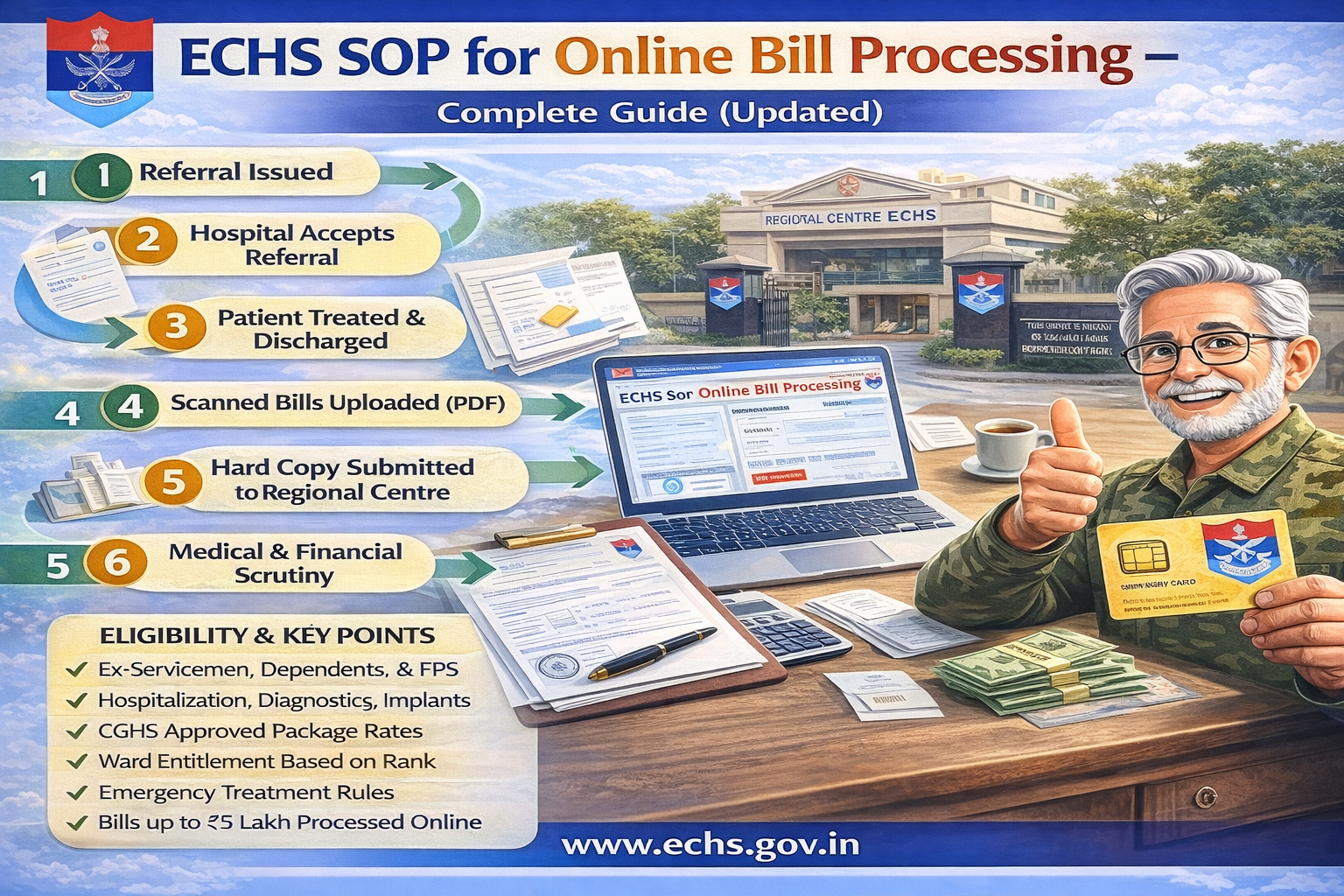
ECHS SOP for Online Bill Processing – Complete Guide (Updated)

The Ex-Servicemen Contributory Health Scheme (ECHS) provides comprehensive medical care to ex-servicemen, pensioners, and their eligible dependents. To ensure transparency and faster settlements, ECHS has introduced a structured Online Bill Processing System governed by an official Standard Operating Procedure (SOP).

This article explains the ECHS Online Bill Processing SOP in simple terms, covering eligibility, referrals, reimbursement rules, emergency cases, package rates, implants, and the complete online workflow.

Official SOP PDF:
https://www.echs.gov.in/assets/General%20SOP/SOP%20Online%20Bill%20Processing.pdf


What Is ECHS Online Bill Processing?

ECHS Online Bill Processing is a digital system used to:

  • Process bills of empanelled hospitals
  • Reimburse eligible expenses for non-empanelled emergency treatments
  • Reduce delays, paperwork, and manual errors
  • Ensure payments as per CGHS / ECHS approved rates

The system applies to hospitalization, diagnostics, procedures, implants, and follow-up care.


Who Is Eligible Under ECHS?

ECHS benefits apply to:

  • Ex-servicemen drawing Service or Disability Pension
  • Widows receiving Family / Liberalized Family Pension
  • Spouse of pensioner
  • Unemployed sons below 25 years
  • Unemployed or unmarried daughters
  • Dependent parents (income below prescribed limit)
  • Mentally or physically challenged children (lifelong)
  • Newborn baby (up to 3 months, with birth certificate)

How Medical Treatment Works Under ECHS

1. Treatment Through ECHS Polyclinics

  • ECHS Polyclinics provide OPD services
  • If advanced care is required, referral is issued

2. Referral to Hospitals

Referrals can be made to:

  • Armed Forces Medical Services Hospitals
  • Empanelled Private Hospitals
  • Diagnostic & Dental Centres

Important: Referrals are issued only by authorized ECHS medical staff.


Ward Entitlement Based on Rank

Rank at RetirementWard Entitlement
NCOs & BelowGeneral Ward
JCOsSemi-Private Ward
OfficersPrivate Ward

If a higher ward is used due to non-availability, billing is restricted to entitlement only.


ECHS Package Rates – How Billing Works

ECHS follows CGHS Package Rates, which include:

  • Room charges & diet
  • Doctor visits
  • Surgery & OT charges
  • ICU/ICCU charges
  • Medicines & consumables
  • Investigations
  • Nursing & physiotherapy

Standard Package Duration

  • Super-speciality: 12 days
  • Major surgery: 7 days
  • Laparoscopic/Delivery: 3 days
  • Day care/minor surgery: 1 day

Extra stay is allowed only with medical justification and approval.


Emergency Treatment Rules

  • Emergency treatment is allowed in any hospital
  • Inform nearest ECHS Polyclinic within 48 hours
  • Emergency Information Report (EIR) is generated
  • Reimbursement is limited to CGHS/ECHS rates

Examples of emergencies:

  • Heart attack, stroke
  • Severe injuries & accidents
  • Acute respiratory failure
  • Snake bite, poisoning
  • Dialysis as life-saving emergency

Online Bill Processing Flow (Simplified)

Step-by-Step Process

  1. Referral issued by ECHS Polyclinic
  2. Hospital accepts referral
  3. Patient treated & discharged
  4. Hospital uploads:
    • Scanned bills (PDF)
    • Discharge summary
    • Investigation reports
  5. Hard copy submitted to Regional Centre
  6. Medical & financial scrutiny
  7. Approval by CFA (Competent Financial Authority)
  8. Payment released via ECS directly to hospital

Bills up to ₹5 lakh are processed online.
Bills above ₹5 lakh require Central Organization approval.

ECHS Mediclaim Reimbursement Process: ECHS SOP for Online Bill Processing – Complete Guide (Updated)

Documents Required for Bill Submission

Mandatory documents include:

  • ECHS Card copy
  • Referral letter
  • Emergency certificate (if applicable)
  • Discharge summary
  • Itemized & final bills
  • Investigation reports
  • Implant invoices with stickers
  • Prior approval (for unlisted procedures)

All pages must be serially numbered.


Implants & Special Procedures

ECHS reimburses implants like:

  • Cardiac stents
  • Pacemakers
  • Orthopedic implants
  • Neuro implants
  • Cochlear implants
  • IOL (eye lenses)

Reimbursement is limited to CGHS ceiling rates.
Original invoices and implant stickers are mandatory.


Oncology, Dialysis & Long-Term Care

  • Oncology referrals are issued once for full treatment cycle
  • Chemotherapy & radiotherapy billed at CGHS super-speciality rates
  • Dialysis allowed as emergency even in non-empanelled hospitals
  • Rehabilitation & terminal care allowed up to 6 months

Follow-Up & Repeat Treatment

  • Referrals valid for 1 month
  • Renewed referrals required for ongoing treatment
  • Oncology referrals exempt from monthly limit

Key Do’s and Don’ts

Do’s

✔ Always take treatment via ECHS referral
✔ Submit bills within one month of discharge
✔ Keep original bills & reports
✔ Inform polyclinic immediately in emergencies

Don’ts

✖ Do not exceed ward entitlement
✖ Do not purchase medicines externally during hospitalization
✖ Do not delay bill submission without approval


Final Words

The ECHS Online Bill Processing SOP ensures:

  • Transparency
  • Faster reimbursements
  • Uniform medical billing
  • Financial protection for veterans and families

Understanding this SOP helps beneficiaries avoid claim rejections, delays, and unnecessary expenses.

How to Login to ECHS Beneficiary Portal Using Card Number & OTP (Step-by-Step Guide)

The ECHS Beneficiary Login portal allows ex-servicemen and their dependents to submit medical reimbursement claims online and track claim status. The login process is OTP-based, ensuring security and ease of access.

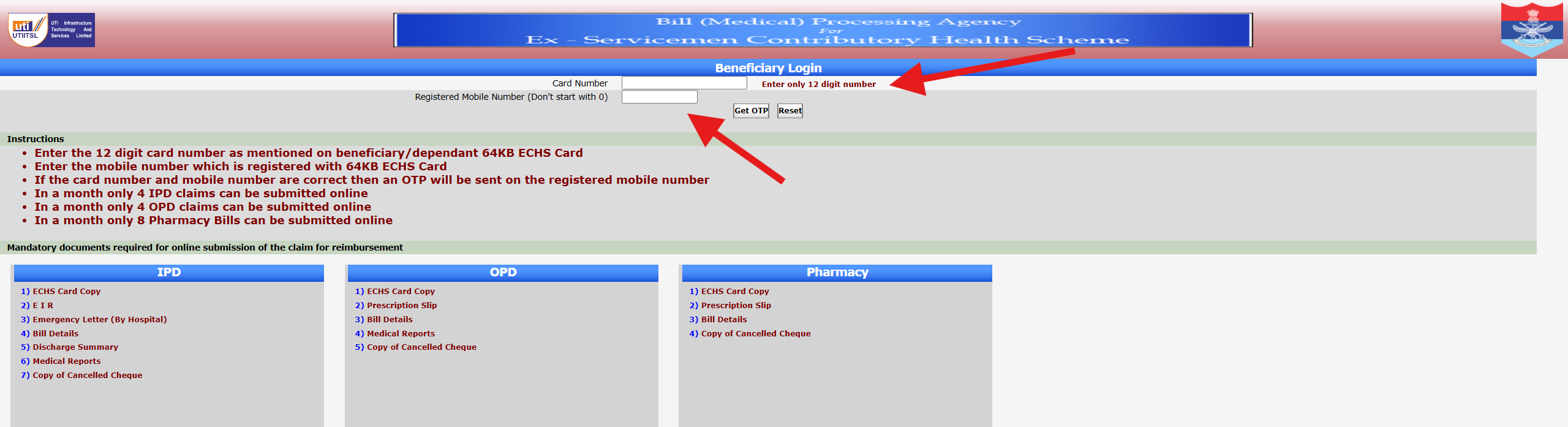
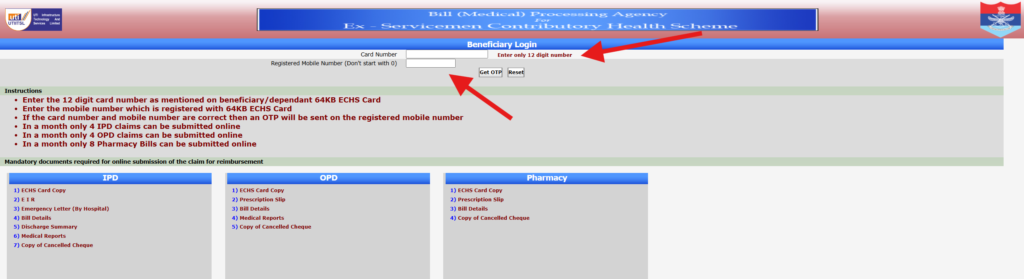
This guide explains how to log in to the ECHS beneficiary portal using your 12-digit ECHS card number and registered mobile number, based on the official screen shown above.


Who Can Use the ECHS Beneficiary Login?

The following beneficiaries can access this login system:

  • Ex-servicemen registered under ECHS
  • Dependents listed on a valid ECHS card
  • Widows of ex-servicemen covered under ECHS

Your ECHS card and mobile number must be linked and active.


Step-by-Step Process to Login to ECHS Portal

Step 1: Open the Official ECHS Beneficiary Login Page

Use a desktop or laptop for best results. Ensure you are on the official ECHS portal page that shows “Beneficiary Login” at the top.


Step 2: Enter Your 12-Digit ECHS Card Number

  • Enter only the 12-digit card number
  • Do not add spaces or extra characters
  • The number must match exactly as printed on your 64KB ECHS card

📌 Important: Entering an incorrect card number will prevent OTP generation.


Step 3: Enter Registered Mobile Number

  • Enter the mobile number registered with your ECHS card
  • Do not start the number with 0
  • Ensure the mobile network is active

Step 4: Click “Get OTP”

  • If both card number and mobile number are correct, an OTP will be sent
  • OTP delivery usually takes a few seconds

If required, you may click Reset to clear entered details.


Step 5: Enter OTP and Proceed

  • Enter the OTP exactly as received
  • Submit to access your ECHS claim dashboard

Once logged in, you can submit claims or check claim status.


Important Instructions Shown on the Login Page

The portal clearly mentions the following limits:

  • Maximum 4 IPD claims per month
  • Maximum 4 OPD claims per month
  • Maximum 8 Pharmacy bills per month

Submitting beyond these limits may result in rejection.


Documents Required for Online Claim Submission

After successful login, you must upload documents based on claim type:

IPD (Hospitalisation)

  • ECHS Card Copy
  • Emergency Information Report (EIR)
  • Emergency Letter (if applicable)
  • Hospital Bills
  • Discharge Summary
  • Medical Reports
  • Cancelled Cheque Copy

OPD Claims

  • ECHS Card Copy
  • Prescription Slip
  • Bill Details
  • Medical Reports
  • Cancelled Cheque Copy

Pharmacy Claims

  • ECHS Card Copy
  • Prescription Slip
  • Bill Details
  • Cancelled Cheque Copy

Ensure documents are clear, readable, and complete.


Common Login Problems & Solutions

OTP Not Received

  • Check network coverage
  • Wait 1–2 minutes and retry
  • Ensure mobile number is correctly registered with ECHS

Invalid Card Number Error

  • Recheck the 12-digit number
  • Avoid copy-paste errors
  • Confirm card validity with your parent polyclinic

Portal Not Loading

  • Try a different browser
  • Clear cache
  • Access during non-peak hours

Security Tips for Beneficiaries

  • Never share OTP with anyone
  • Log out after use
  • Avoid public computers for login
  • Keep mobile number updated at ECHS polyclinic

Frequently Asked Questions (FAQs)

Is password required for ECHS beneficiary login?

No. Login is done using OTP only.

Can dependents log in using their card number?

Yes, if their mobile number is registered with ECHS.

What if my mobile number is not updated?

You must visit your parent ECHS polyclinic to update it.

Is the portal available 24×7?

Mostly yes, but temporary downtime may occur due to maintenance.


Conclusion

The ECHS Beneficiary Login portal is designed to make medical claim submission and tracking easier for ex-servicemen and their families. By correctly entering the 12-digit ECHS card number and registered mobile number, beneficiaries can securely access online services using OTP-based login.

Disclaimer:
This article is for informational purposes only. The website is not affiliated with ECHS, the Ministry of Defence, or the Government of India. Always verify details from official ECHS sources.

How to Access the ECHS Portal Online – Step-by-Step Guide for Beneficiaries (2025)

The Ex-Servicemen Contributory Health Scheme (ECHS) provides online facilities for beneficiaries to check medical claim status, access hospital details, and manage reimbursement-related services. To make these services accessible, ECHS operates an official Bill (Medical) Processing Agency portal, which many beneficiaries use for login and claim tracking.

This article explains how to access the ECHS portal online, what each section on the screen means, and how beneficiaries can safely log in and use the available options.


What Is the ECHS Online Portal?

The ECHS online portal is an official digital platform used for:

  • Beneficiary login
  • Medical claim status checking
  • Hospital and empanelment details
  • Reimbursement-related processing

The portal is mainly managed through the ECHS Bill (Medical) Processing Agency, which handles claim verification and processing.


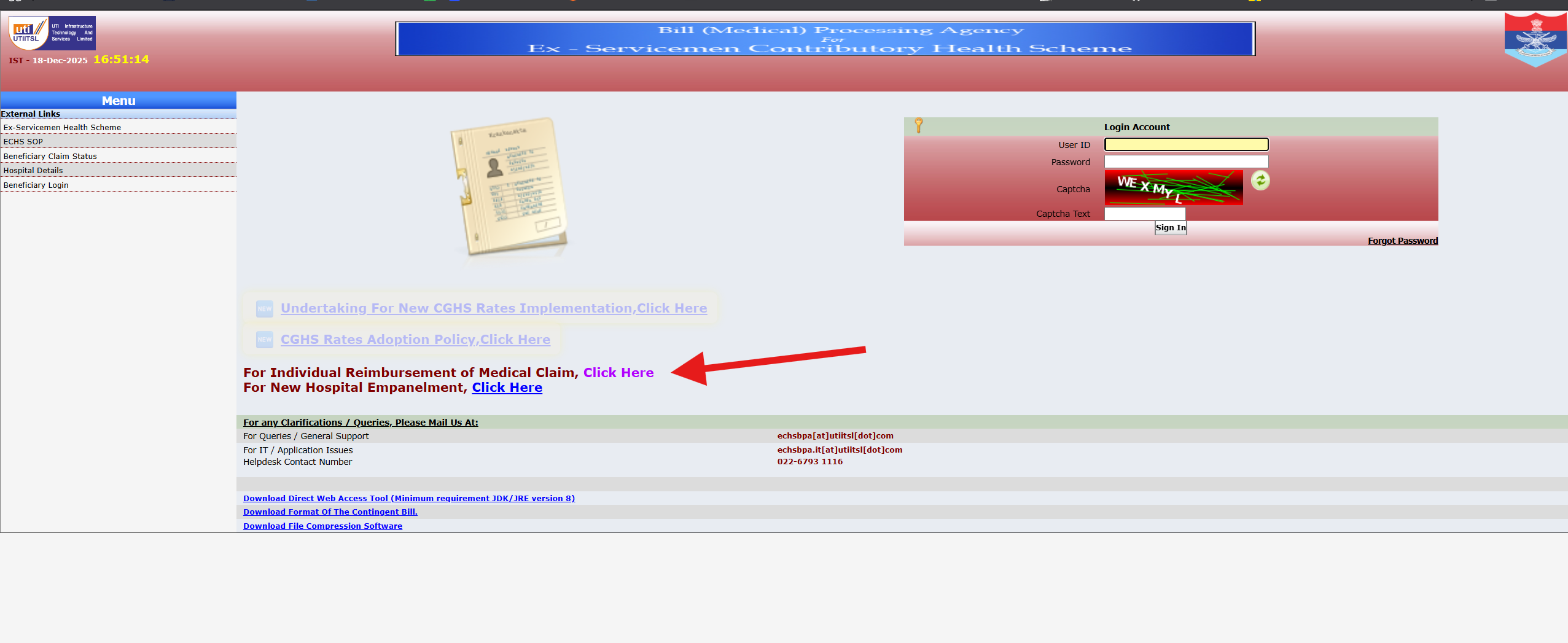
Understanding the ECHS Portal Home Screen

When you open the ECHS portal, you will typically see:

Top Header Section

  • Portal title related to Bill (Medical) Processing Agency – ECHS
  • Date and time (Indian Standard Time)
  • Official government and service logos

This confirms you are on the official ECHS system.


Left-Side Menu (Navigation Panel)

The left menu usually contains links such as:

  • Ex-Servicemen Health Scheme
  • ECHS SOP (Standard Operating Procedures)
  • Beneficiary Claim Status
  • Hospital Details
  • Beneficiary Login

These options allow users to directly access the required service without navigating multiple pages.


How to Log in to the ECHS Portal (Step-by-Step)

Follow these steps carefully to access your ECHS account:

Step 1: Open the Official ECHS Portal

Use a desktop or laptop browser for a smoother experience. Ensure your internet connection is stable.


Step 2: Locate the Login Account Section

On the right side of the screen, you will see the Login Account box with the following fields:

  • User ID
  • Password
  • Captcha
  • Captcha Text box
  • Sign In button

Step 3: Enter Login Credentials

  • Enter your User ID exactly as provided
  • Type your password carefully
  • Enter the captcha text shown in the image

Captcha is mandatory for security and must match exactly.


Step 4: Click “Sign In”

Once details are correct, click the Sign In button to access your dashboard.


Forgot Password Option

If you have forgotten your password, use the “Forgot Password” link provided below the login section and follow the instructions.


How to Check ECHS Medical Claim Status

If you only want to check your claim status:

  1. Click “Beneficiary Claim Status” from the left menu
  2. Enter required reference details
  3. View current claim status such as:
    • Under Process
    • Approved
    • Rejected (with remarks, if any)

Other Important Links on the Portal

The portal also provides:

  • Notifications related to CGHS rate updates
  • Hospital empanelment information
  • Download links for contingent bill formats
  • Technical helpdesk contact details

These links are useful for beneficiaries and hospitals alike.


Common Problems While Accessing ECHS Portal

1. Login Page Not Loading

  • Try refreshing the page
  • Use a different browser
  • Access during non-peak hours

2. Invalid Login Credentials

  • Double-check User ID and password
  • Ensure Caps Lock is off
  • Use the Forgot Password option if needed

3. Captcha Error

  • Reload captcha using refresh icon
  • Enter characters carefully

Important Tips for Safe Access

  • Always use the official ECHS portal
  • Never share login details with anyone
  • Log out after use, especially on shared computers
  • Keep your contact details updated with your parent ECHS polyclinic

Frequently Asked Questions (FAQs)

Who can access the ECHS portal?

Registered ECHS beneficiaries, authorized hospital users, and officials.

Is the ECHS portal available 24×7?

Generally yes, but it may be temporarily unavailable during maintenance.

Can dependents access the portal?

Access depends on registration and linked credentials.


Conclusion

The ECHS online portal makes it easier for ex-servicemen and their families to access medical claim information and related services without visiting offices repeatedly. By understanding the portal layout and following the correct login steps, beneficiaries can safely and efficiently access ECHS services online.

Disclaimer:
This article is for informational purposes only. The website is not affiliated with ECHS, the Ministry of Defence, or the Government of India. Always verify information from official ECHS sources.

ECHS Login Problems & Fix – Common Issues and Easy Solutions (2025 Guide)

The Ex-Servicemen Contributory Health Scheme (ECHS) provides essential healthcare services to ex-servicemen and their dependents. Many beneficiaries use the ECHS online portal for services such as online applications, reimbursement claims, and beneficiary details.

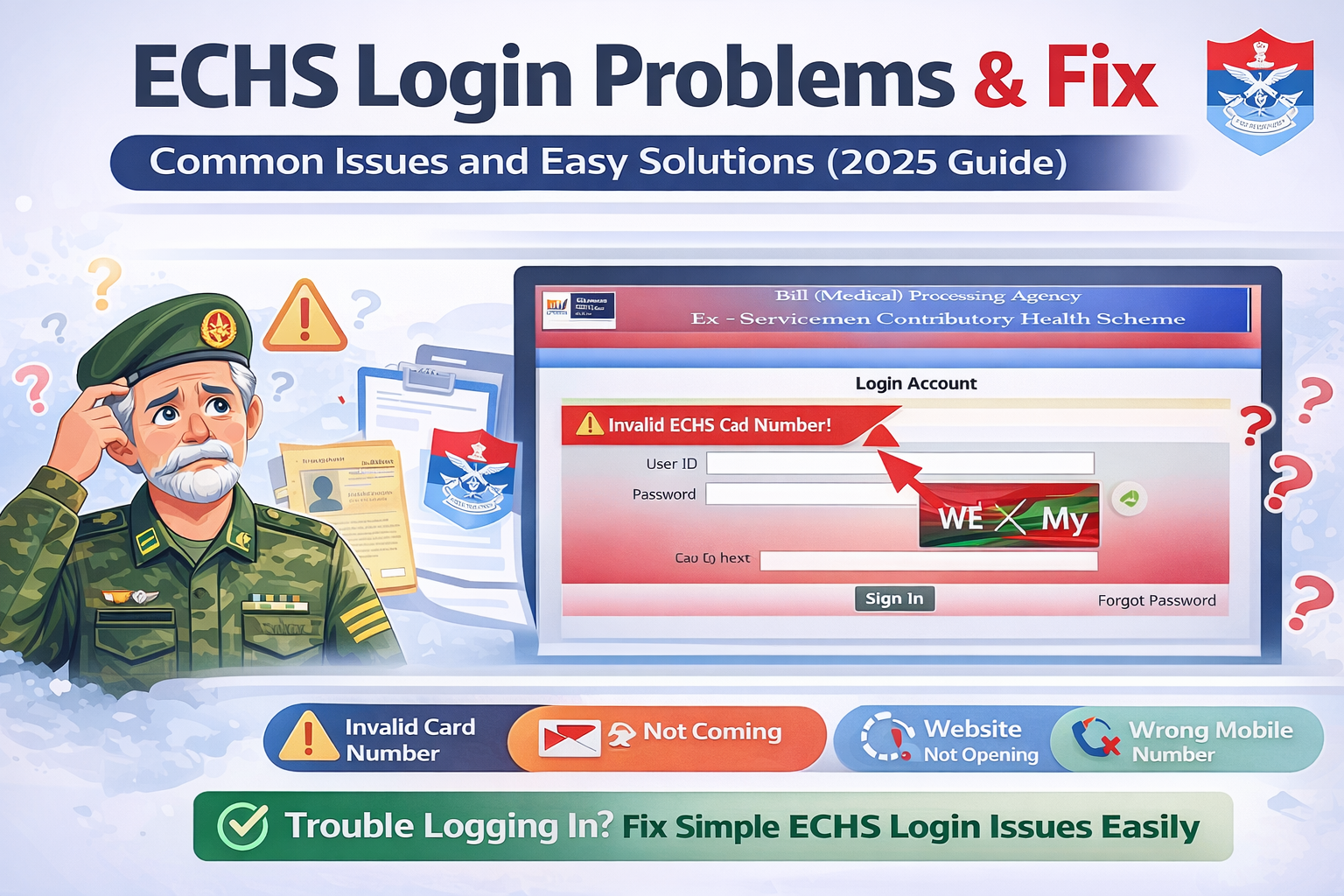
However, users often face ECHS login problems, especially while accessing the portal using their ECHS card number or registered mobile number. If you are struggling to log in, this guide will help you understand the most common ECHS login issues and their practical fixes.


Common ECHS Login Problems

Below are the most frequently reported issues faced by ECHS beneficiaries while logging in to the portal.


1. Invalid ECHS Card Number Error

Problem

You may see an error like “Invalid ECHS Card Number” while logging in.

Possible Reasons

  • Incorrect entry of the 12-digit ECHS card number
  • Extra space before or after the number
  • Using an expired or deactivated ECHS card

Fix

  • Carefully re-enter the 12-digit ECHS card number
  • Avoid copy-paste; type manually
  • Ensure your ECHS card is active and valid
  • If the card is expired, contact your parent ECHS polyclinic

2. OTP Not Received on Registered Mobile Number

Problem

OTP is not delivered even after multiple attempts.

Possible Reasons

  • Poor mobile network coverage
  • DND (Do Not Disturb) enabled
  • Mobile number not updated in ECHS records
  • Server delay

Fix

  • Check network signal and try again after a few minutes
  • Restart your phone
  • Disable DND temporarily
  • Ensure your mobile number is updated at your ECHS polyclinic
  • Try logging in during non-peak hours

3. ECHS Website Not Opening or Loading Slowly

Problem

The ECHS portal does not load or gets stuck.

Possible Reasons

  • Heavy traffic on the website
  • Server maintenance
  • Browser cache issues

Fix

  • Refresh the page after a few minutes
  • Clear browser cache and cookies
  • Try opening the website in Incognito mode
  • Use a different browser (Chrome / Edge / Firefox)
  • Avoid peak hours (morning and afternoon)

4. Login Successful but Dashboard Not Loading

Problem

You log in successfully but cannot access services or dashboard.

Possible Reasons

  • Session timeout
  • Browser compatibility issue
  • Temporary portal glitch

Fix

  • Log out and log in again
  • Clear cache and cookies
  • Use a desktop or laptop instead of mobile
  • Try a different browser

5. Mobile Number Not Linked With ECHS Card

Problem

OTP is sent to an unknown or old mobile number.

Fix

  • Visit your parent ECHS polyclinic
  • Request mobile number update
  • Carry ECHS card and valid ID proof
  • After updating, wait 24–48 hours and try again

6. “Service Temporarily Unavailable” Error

Problem

The portal shows a service unavailable message.

Reason

  • Backend maintenance or technical upgrade

Fix

  • This is a server-side issue
  • Wait and try again after some time
  • Check during late evening or early morning hours

7. Forgot Login Details or Unable to Authenticate

Fix

  • Use the OTP-based login only
  • Ensure correct ECHS card number and mobile number
  • If problem persists, contact your polyclinic

ECHS Login Tips for Smooth Access

✔ Always use a stable internet connection
✔ Prefer desktop or laptop for login
✔ Keep ECHS card details handy
✔ Login during non-peak hours
✔ Regularly update your mobile number


What to Do If ECHS Login Problem Is Not Fixed?

If none of the above solutions work:

  • Visit your parent ECHS polyclinic
  • Contact the ECHS Regional Centre
  • Carry:
    • ECHS card
    • Aadhaar / ID proof
    • Registered mobile number

They can verify records and resolve backend issues.


Frequently Asked Questions (FAQs)

Why is ECHS OTP not coming?

OTP issues usually occur due to network problems, DND settings, or an unregistered mobile number.

Can I log in to ECHS portal without OTP?

No. ECHS uses OTP-based authentication only.

Is ECHS login available 24×7?

The portal is generally available 24×7 but may be temporarily down due to maintenance.

Can dependents log in to the ECHS portal?

Yes, if their mobile number is registered and linked with the ECHS card.


Conclusion

ECHS login problems are usually caused by minor technical issues, outdated mobile details, or server load. Most of these problems can be resolved easily by following the fixes mentioned above.

For persistent login issues, contacting your parent ECHS polyclinic is the most reliable solution.

FAQ

Frequently Asked Questions (FAQ) – MCO Quota in Indian Railways

1. What is MCO Quota in Indian Railways?

MCO Quota is a special railway reservation quota for defence personnel and their dependents. MCO stands for Movement Control Office, which manages and facilitates railway travel for the Army, Navy, and Air Force.


2. What is DDQ Quota in Railways?

DDQ stands for Defence Department Quota. It is another name for the MCO quota used for reserving seats for defence personnel in Indian Railways.


3. Who is eligible for MCO Quota?

The following are eligible:

  • Serving defence personnel (Army, Navy, Air Force)
  • Dependents of serving defence personnel with valid ID

4. Is MCO Quota available for retired defence personnel?

In most cases, the MCO quota is meant for serving defence personnel. Retired personnel generally do not fall under MCO unless specifically authorised for official movement.


5. Is MCO Quota available for all trains?

No. MCO quota availability depends on:

  • Train type
  • Route
  • Class of travel
  • Operational requirements

6. How many seats are reserved under MCO Quota?

There is no fixed number of seats. Availability varies based on train, route, and demand.


7. Can I book MCO Quota tickets online through IRCTC?

No. MCO quota tickets cannot be booked directly via IRCTC. Booking must be coordinated through the designated MCO office.


8. What documents are required for MCO Quota booking?

You need:

  • Filled MCO quota application form
  • Photocopy of train ticket (if already booked or waitlisted)
  • Valid defence ID (Serving Certificate / CSD Smart Card / Dependent Card)

9. Do I need to book a general ticket before applying for MCO Quota?

In many cases, yes. A photocopy of an already booked or waitlisted ticket is often required for verification.


10. How can I apply for MCO Quota tickets?

You can apply by:

  • Submitting documents via email to the MCO office
  • Visiting the nearest MCO office in person

11. Where are MCO offices located?

MCO offices are usually located at major railway stations and military movement hubs across India.


12. How can I check the status of my MCO Quota application?

You can check the status by contacting the concerned MCO office via phone or email.


13. Can dependents travel under MCO Quota?

Yes. Dependents of serving defence personnel can travel under MCO quota if they have valid dependent identification.


14. Is MCO Quota available for emergency travel?

Yes. MCO quota is especially useful for:

  • Medical emergencies
  • Urgent postings
  • Official duty travel
  • National security requirements

15. Can I cancel a train ticket booked under MCO Quota?

Yes. Cancellation is allowed as per Indian Railways cancellation rules applicable to the class of travel.


16. Are MCO Quota seats guaranteed?

No. Seat allotment depends on availability, route demand, and approval from the MCO office.


17. Is there any extra charge for MCO Quota booking?

No additional charge is levied specifically for MCO quota. Standard railway fares and rules apply.


18. Can MCO Quota tickets be booked at short notice?

Yes. One of the key advantages of MCO quota is facilitating short-notice and priority travel, subject to availability.


19. What should I do if MCO quota seats are not available?

If MCO quota seats are unavailable:

  • Check alternate trains or dates
  • Coordinate again with the MCO office
  • Travel under general quota if required

20. Is MCO Quota different from Railway Ex-Servicemen Quota?

Yes.

  • MCO / DDQ Quota is mainly for serving defence personnel
  • Other concessions or facilities may apply separately to ex-servicemen