
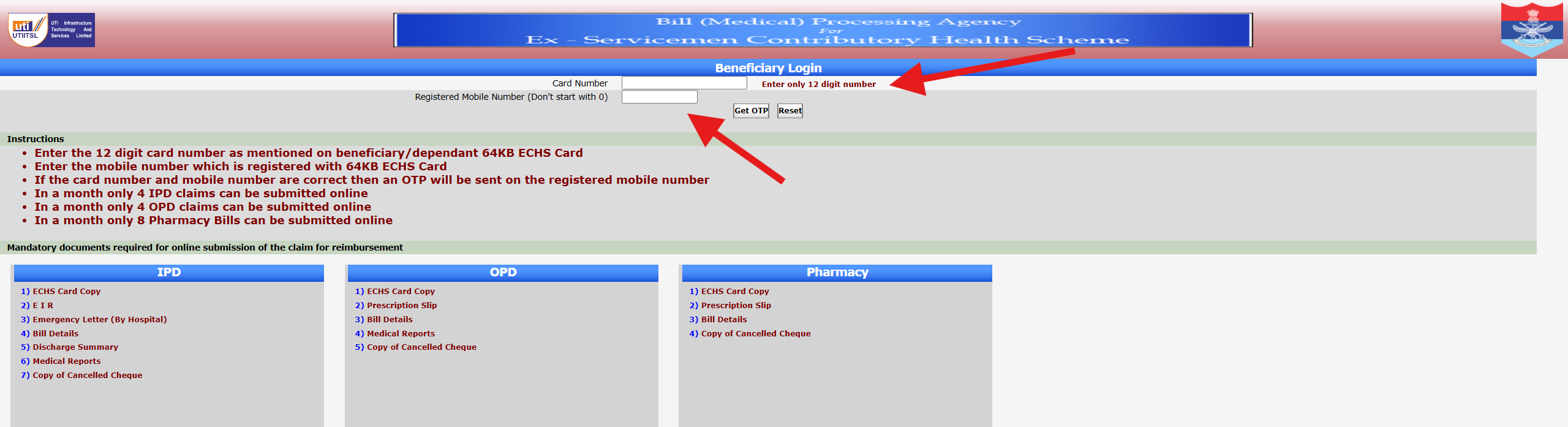
The ECHS Smart Card Login is an essential step for Ex-Servicemen and their dependents to access medical services, claim reimbursements, and verify beneficiary details under the Ex-Servicemen Contributory Health Scheme (ECHS).
Many users face confusion while logging in for the first time or when checking claim-related details. This guide explains how ECHS Smart Card login works, what details are required, and how to fix common problems.
⚠️ Disclaimer: This website is not the official ECHS portal. It is an informational guide created to help beneficiaries understand ECHS processes. For official services, always visit https://www.echs.gov.in.
What Is an ECHS Smart Card?
The ECHS Smart Card is issued to eligible Ex-Servicemen and their dependents after successful registration under ECHS. It contains:
- A unique card number
- Beneficiary and dependent details
- Linked polyclinic information
- Eligibility for cashless treatment and reimbursement
The smart card is required for:
- OPD/IPD treatment
- Medicine bill claims
- Hospital referrals
- Online claim tracking
Is There a Separate “ECHS Smart Card Login”?
Many users search for “ECHS smart card login”, but it’s important to understand this clearly:
👉 There is no separate login portal only for smart cards.
👉 The Smart Card number is used as an identifier during:
- Beneficiary login
- Claim submission
- Claim status checking
- Hospital verification
Official ECHS Login Portal
All smart card–related online services are accessed through the ECHS Beneficiary Login portal:
🔗 Official Website: https://www.echs.gov.in
From here, beneficiaries can:
- Log in using card details
- Check claim status
- View registered dependents
- Access referral-related information
How to Use ECHS Smart Card for Login (Step-by-Step)
Step 1: Visit the Official ECHS Website
Go to echs.gov.in and navigate to the Beneficiary Login section.
Step 2: Enter Smart Card Details
You may be asked to enter:
- ECHS Card Number (12 digits)
- Registered mobile number
- OTP (sent to registered mobile)
Step 3: Verify OTP
Enter the OTP correctly to proceed.
Step 4: Access Dashboard
Once verified, you can:
- Check claim status
- View referral details
- Track medicine bill submissions
Common ECHS Smart Card Login Problems & Fixes
1. Smart Card Number Not Recognized
✔️ Ensure all 12 digits are entered correctly
✔️ Avoid spaces or special characters
2. OTP Not Received
✔️ Check if your mobile number is registered with ECHS
✔️ Network delays are common—retry after a few minutes
3. Mobile Number Changed
If your registered mobile number is no longer active:
- Visit your parent ECHS polyclinic
- Submit a request to update mobile details
4. Website Not Loading
✔️ Try accessing the site during non-peak hours
✔️ Clear browser cache or use a different browser
5. “No Record Found” Error
This usually happens when:
- Smart card is newly issued
- Details are not synced yet
- Data mismatch exists
👉 Contact your ECHS Polyclinic for verification.
Difference Between ECHS Smart Card Login & Hospital Login
| Feature | Smart Card / Beneficiary Login | Hospital Login |
|---|---|---|
| Used by | Ex-Servicemen & Dependents | Empanelled Hospitals |
| Purpose | Claims, referrals, status | Bill uploads, approvals |
| Access | Via echs.gov.in | Separate hospital portal |
👉 If you are a hospital user, read our detailed guide on ECHS Hospital Login.
Important Tips for Smooth Login
- Always keep your smart card number handy
- Ensure your mobile number is active
- Avoid third-party or fake ECHS websites
- Never share OTP or card details with anyone
Frequently Asked Questions (FAQs)
Can I log in using only my smart card?
No. The smart card works along with OTP-based mobile verification.
Is ECHS Smart Card login available 24/7?
The portal is online, but maintenance or server issues may occur.
Can dependents use the same smart card login?
Yes. Dependents are linked to the primary beneficiary’s smart card.
Internal Links You Should Add (Very Important for SEO)
Inside this article, link to:
- ECHS Login – Official Portal & Common Errors
- ECHS Claim Status – How to Check Online
- ECHS Medicine Bill Claim Online Process
This builds topical authority and improves rankings.
Final Words
The ECHS Smart Card is the backbone of all online and offline ECHS services. While there is no separate “smart card login,” understanding how it integrates with the beneficiary portal helps avoid confusion and delays.
If you face persistent login issues, always contact your ECHS Polyclinic for official assistance.