
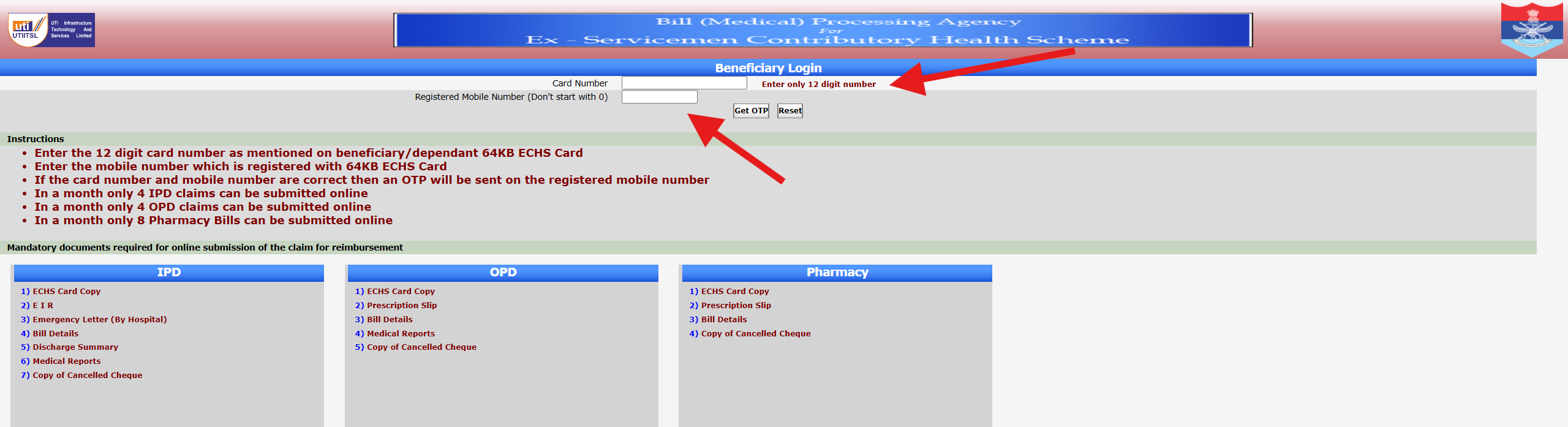
The ECHS Beneficiary Login portal allows ex-servicemen and their dependents to submit medical reimbursement claims online and track claim status. The login process is OTP-based, ensuring security and ease of access.
This guide explains how to log in to the ECHS beneficiary portal using your 12-digit ECHS card number and registered mobile number, based on the official screen shown above.
Who Can Use the ECHS Beneficiary Login?
The following beneficiaries can access this login system:
- Ex-servicemen registered under ECHS
- Dependents listed on a valid ECHS card
- Widows of ex-servicemen covered under ECHS
Your ECHS card and mobile number must be linked and active.
Step-by-Step Process to Login to ECHS Portal
Step 1: Open the Official ECHS Beneficiary Login Page
Use a desktop or laptop for best results. Ensure you are on the official ECHS portal page that shows “Beneficiary Login” at the top.
Step 2: Enter Your 12-Digit ECHS Card Number
- Enter only the 12-digit card number
- Do not add spaces or extra characters
- The number must match exactly as printed on your 64KB ECHS card
📌 Important: Entering an incorrect card number will prevent OTP generation.
Step 3: Enter Registered Mobile Number
- Enter the mobile number registered with your ECHS card
- Do not start the number with 0
- Ensure the mobile network is active
Step 4: Click “Get OTP”
- If both card number and mobile number are correct, an OTP will be sent
- OTP delivery usually takes a few seconds
If required, you may click Reset to clear entered details.
Step 5: Enter OTP and Proceed
- Enter the OTP exactly as received
- Submit to access your ECHS claim dashboard
Once logged in, you can submit claims or check claim status.
Important Instructions Shown on the Login Page
The portal clearly mentions the following limits:
- Maximum 4 IPD claims per month
- Maximum 4 OPD claims per month
- Maximum 8 Pharmacy bills per month
Submitting beyond these limits may result in rejection.
Documents Required for Online Claim Submission
After successful login, you must upload documents based on claim type:
IPD (Hospitalisation)
- ECHS Card Copy
- Emergency Information Report (EIR)
- Emergency Letter (if applicable)
- Hospital Bills
- Discharge Summary
- Medical Reports
- Cancelled Cheque Copy
OPD Claims
- ECHS Card Copy
- Prescription Slip
- Bill Details
- Medical Reports
- Cancelled Cheque Copy
Pharmacy Claims
- ECHS Card Copy
- Prescription Slip
- Bill Details
- Cancelled Cheque Copy
Ensure documents are clear, readable, and complete.
Common Login Problems & Solutions
OTP Not Received
- Check network coverage
- Wait 1–2 minutes and retry
- Ensure mobile number is correctly registered with ECHS
Invalid Card Number Error
- Recheck the 12-digit number
- Avoid copy-paste errors
- Confirm card validity with your parent polyclinic
Portal Not Loading
- Try a different browser
- Clear cache
- Access during non-peak hours
Security Tips for Beneficiaries
- Never share OTP with anyone
- Log out after use
- Avoid public computers for login
- Keep mobile number updated at ECHS polyclinic
Frequently Asked Questions (FAQs)
Is password required for ECHS beneficiary login?
No. Login is done using OTP only.
Can dependents log in using their card number?
Yes, if their mobile number is registered with ECHS.
What if my mobile number is not updated?
You must visit your parent ECHS polyclinic to update it.
Is the portal available 24×7?
Mostly yes, but temporary downtime may occur due to maintenance.
Conclusion
The ECHS Beneficiary Login portal is designed to make medical claim submission and tracking easier for ex-servicemen and their families. By correctly entering the 12-digit ECHS card number and registered mobile number, beneficiaries can securely access online services using OTP-based login.
Disclaimer:
This article is for informational purposes only. The website is not affiliated with ECHS, the Ministry of Defence, or the Government of India. Always verify details from official ECHS sources.